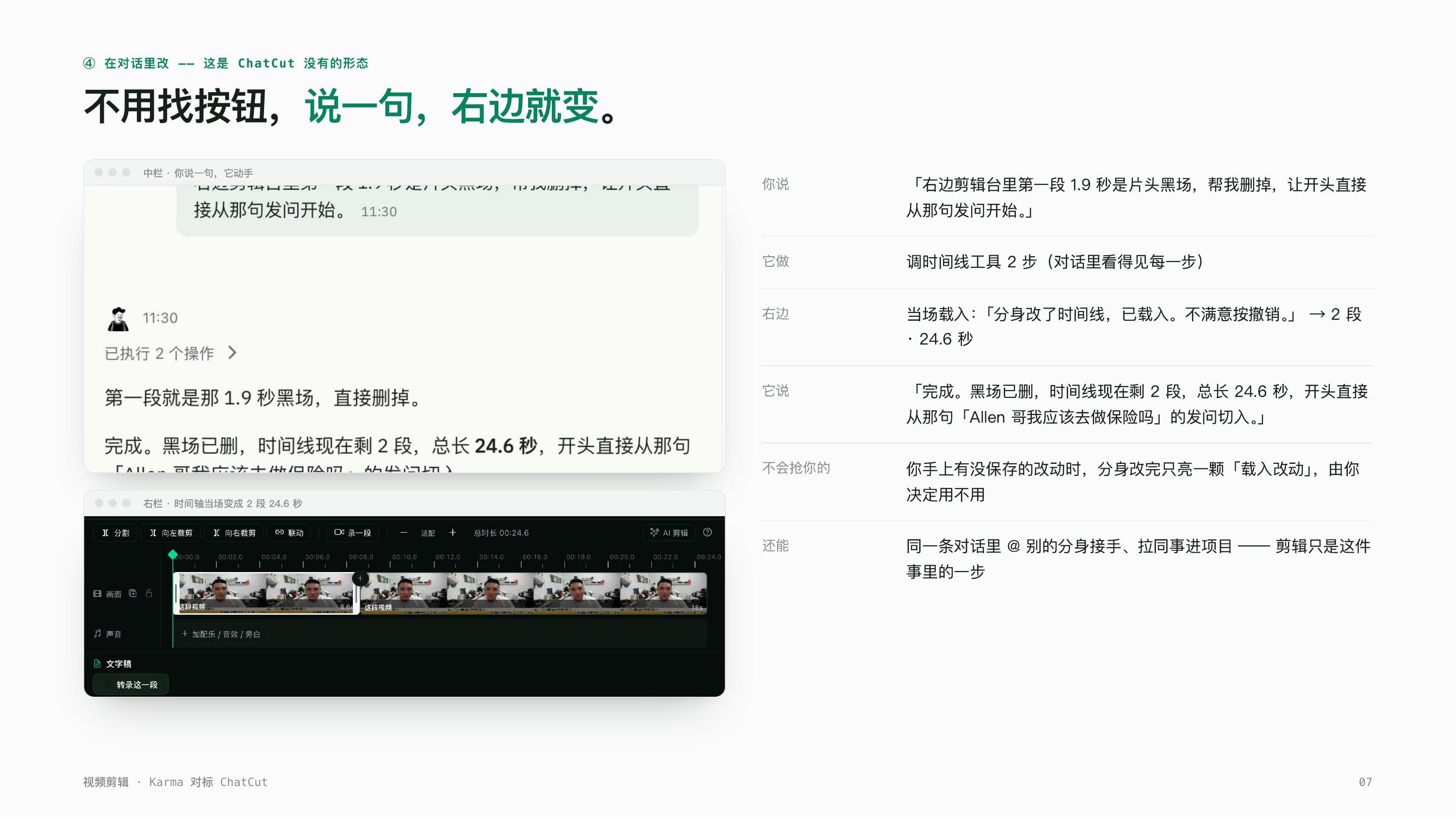
There's a debate in our team that's never really been settled: should an editing tool learn to "take instructions" at all. It started because one of our content folks had been using ChatCut and kept dropping a line in the group chat, "at least it understands what I'm telling it", half bragging, half resigned, resigned because our own video-editing avatar was still being tuned at the time and we didn't have a real comparison to show. Last week I finally carved out some time, grabbed a 90-second English interview clip (Creative Commons Attribution, so nobody asks about rights), ran it through our own dev-environment test account, and did exactly one thing the whole way through: type plain instructions into the chat box and see whether it could match what ChatCut does, and maybe catch a few things ChatCut can't.
A word on the source material first. This clip was the classic can-be-cut-but-nobody-wants-to-cut-it kind of footage: nearly 2 seconds of black at the open, small talk and repetition sprinkled through the middle, and maybe 20-odd seconds of actual signal in the whole thing. Running that through a traditional editor usually means: import, drag out the timeline, put headphones on and listen line by line, mark what to cut, then manually drag-trim it, and for a 90-second clip, just figuring out what to cut means dragging back and forth three or four times. What we wanted to test was swapping that whole sequence for a handful of chat messages, and seeing what got lost and what showed up instead.
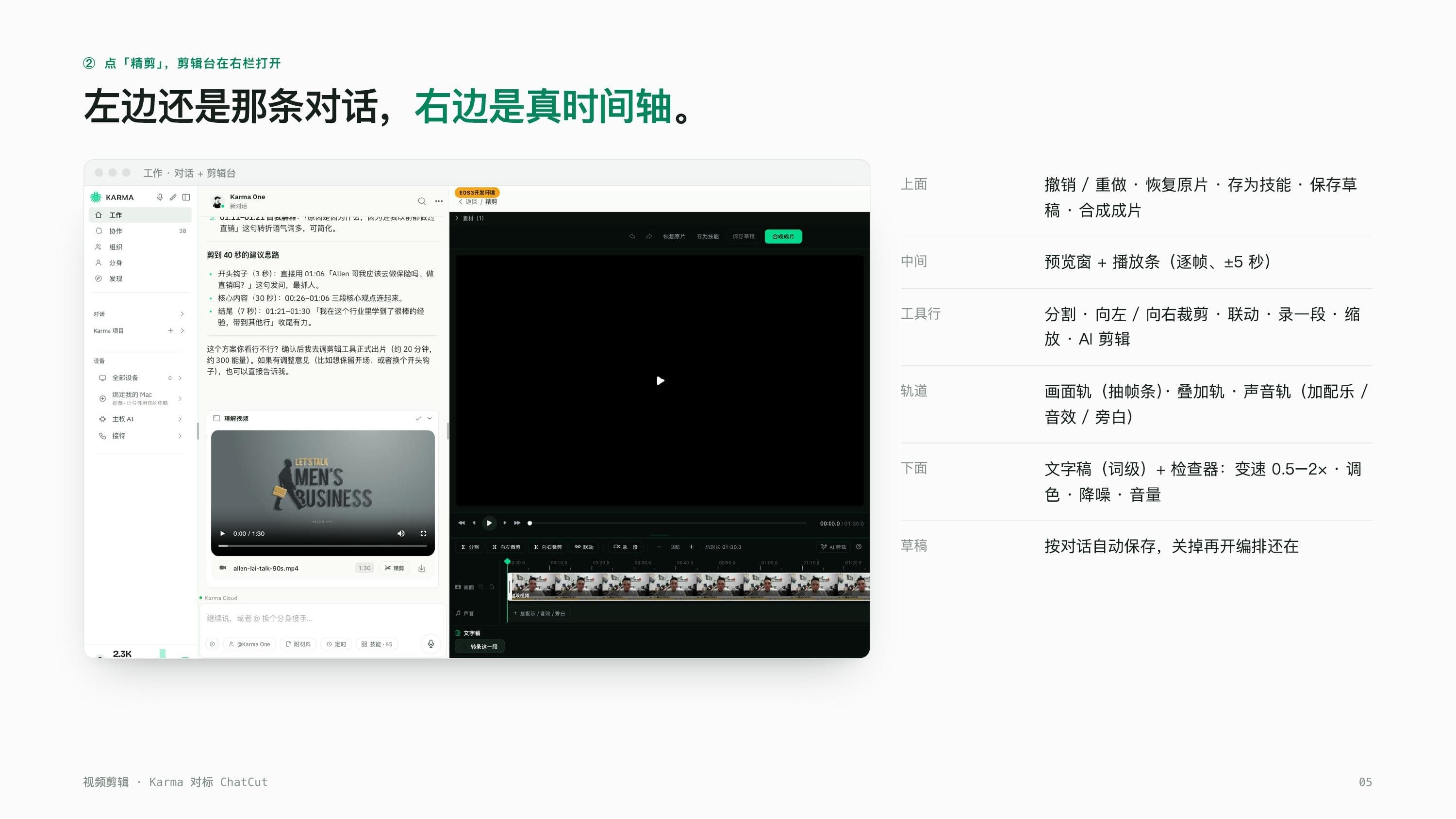
"Tell me what it's about and what drags."
I dropped the source clip into the chat and typed that line, and after about a minute, back came a result: the full clip split into 8 segments, with 3 flagged "worth cutting", and the reasons were specific, not empty lines like "this part isn't important" but things like "this repeats the previous sentence" or "this is small talk, no new information". Honestly I stared at that result for a second, because it was almost exactly the note I'd have written myself after listening through with headphones, except it saved me the twenty minutes. ChatCut can do something similar here too, its word-level transcript and content-based cutting are a genuinely recognized strength, but the difference is that this step with Karma feels more like a conversation than a reading assignment. I don't have to read through a transcript myself hunting for the draggy part, it just tells me the conclusion, and I can follow up with the next instruction without ever switching into "reading mode".
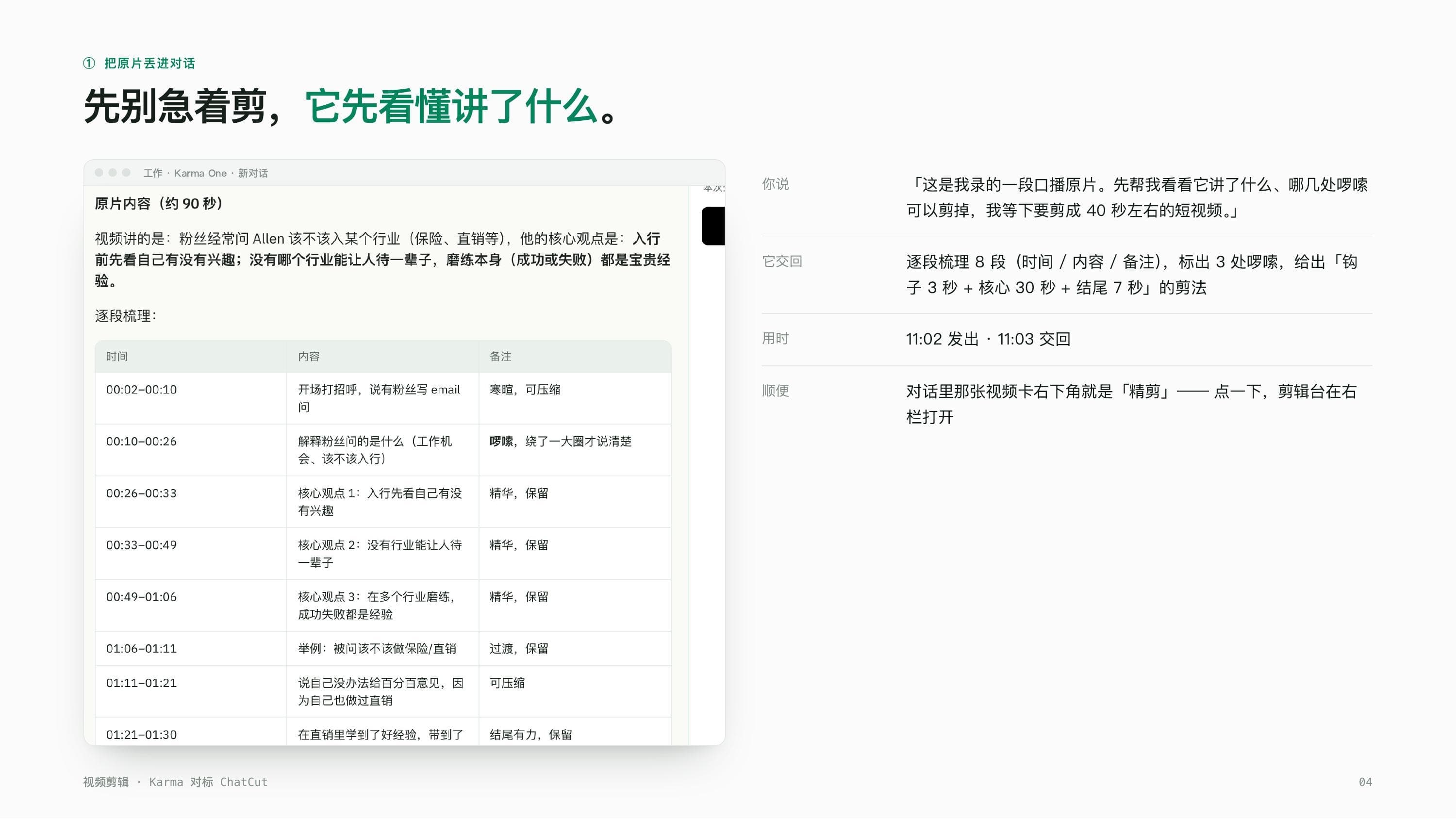
"Cut it to about 40 seconds, open on the question, drop the small talk."
I clicked fine cut, went into AI edit, typed that line in, and waited about 100 seconds. The receipt didn't just toss back a "done". It was upfront: "usable material comes to about 22 seconds, can't stretch to 40." My first reaction, honestly, was mild annoyance, did I really wait a minute and a half for that. Then I realized it's actually the selling point looked at the other way: it didn't pad a few seconds of filler just to hit a number I'd thrown out casually. The final timeline ran from 90 seconds down to 26.5 seconds, three segments, opening right on the question. That kind of honesty, saying "can't do it" when it can't, makes me trust it with the next task more than a tool that always answers "done" no matter what.
The intro was still there, so I just said one more thing
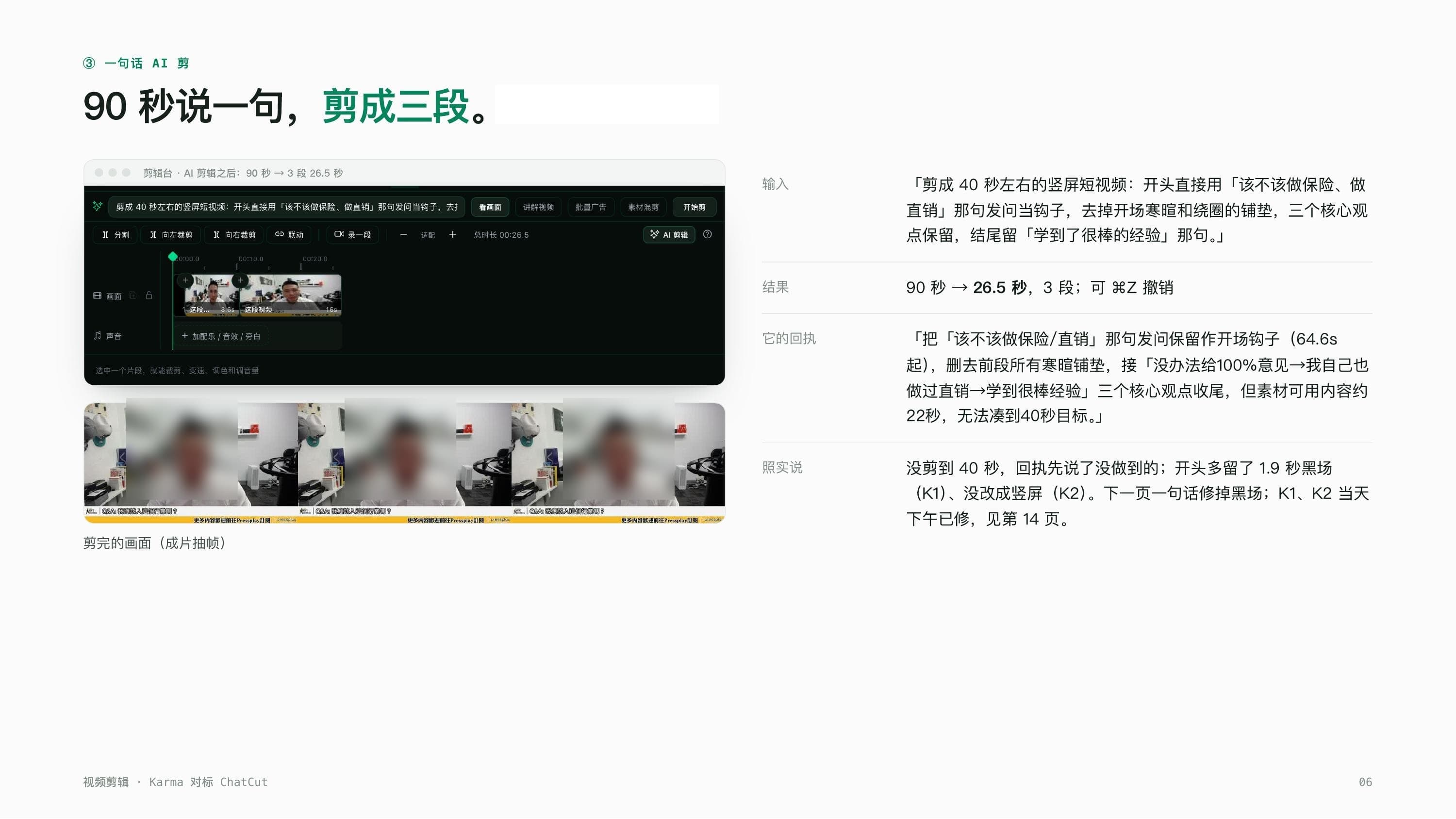
After the cut I looked it over again and noticed the 1.9-second black intro was still sitting there, not fully removed. The old way, I'd open the editor, find that small section, and manually drag it out. Instead I just typed into the chat: "the first clip on the right is the black intro, delete it, start straight on the question." No timecode, no specifying which frame exactly, honestly even I thought that line was a bit vague. The timeline updated right there anyway, with a prompt saying "the avatar changed the timeline, now loaded", landing at 24.6 seconds across two segments, and still one click away from undo. This was the smoothest step in the whole run for me. Changing your editing intent doesn't require knowing how an editor's UI logic works, you just need to say clearly what you want, and it figures out which part of the timeline that maps to.
Last step: compose it, hand it to the avatar built for finished narration cuts
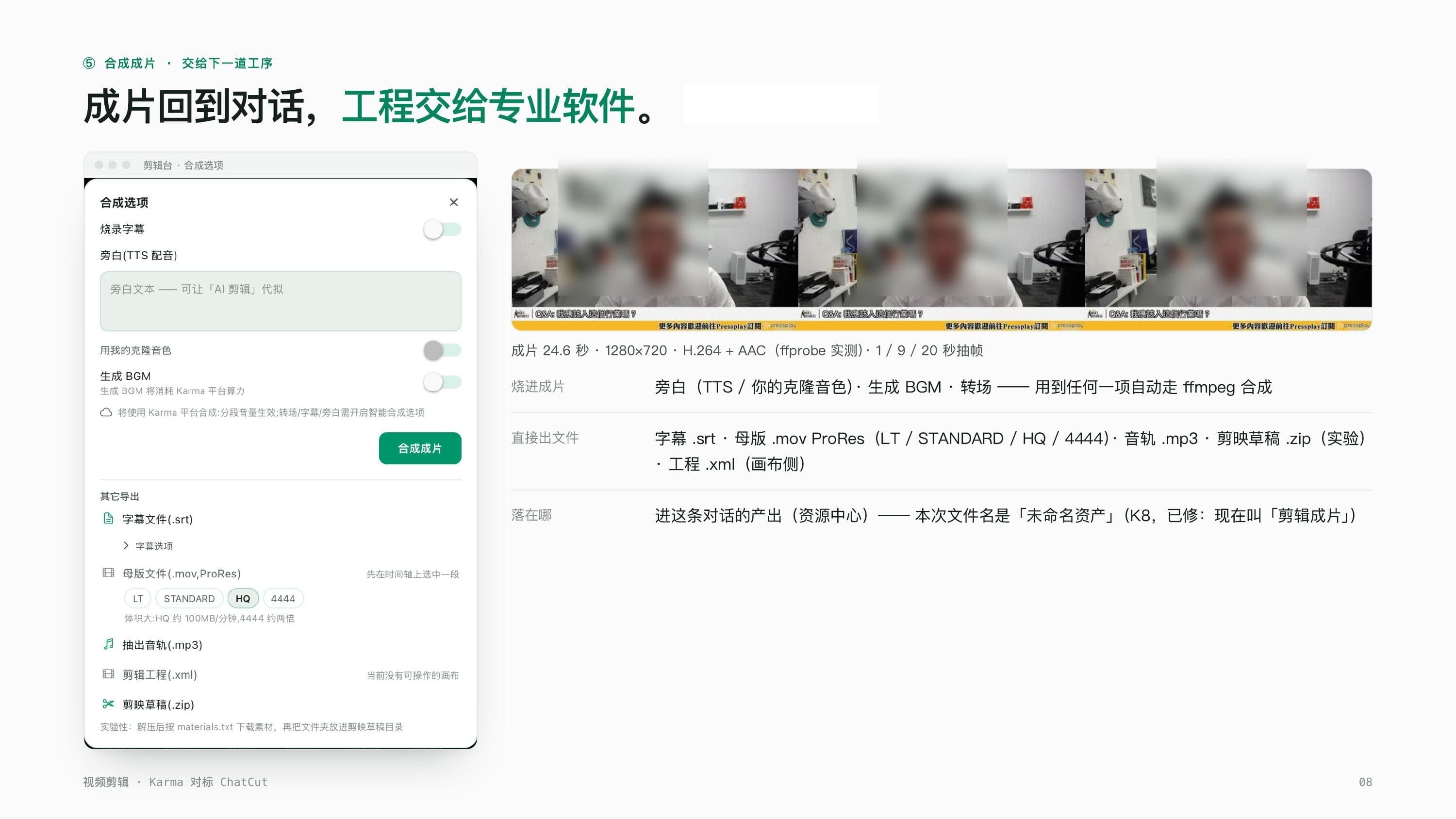
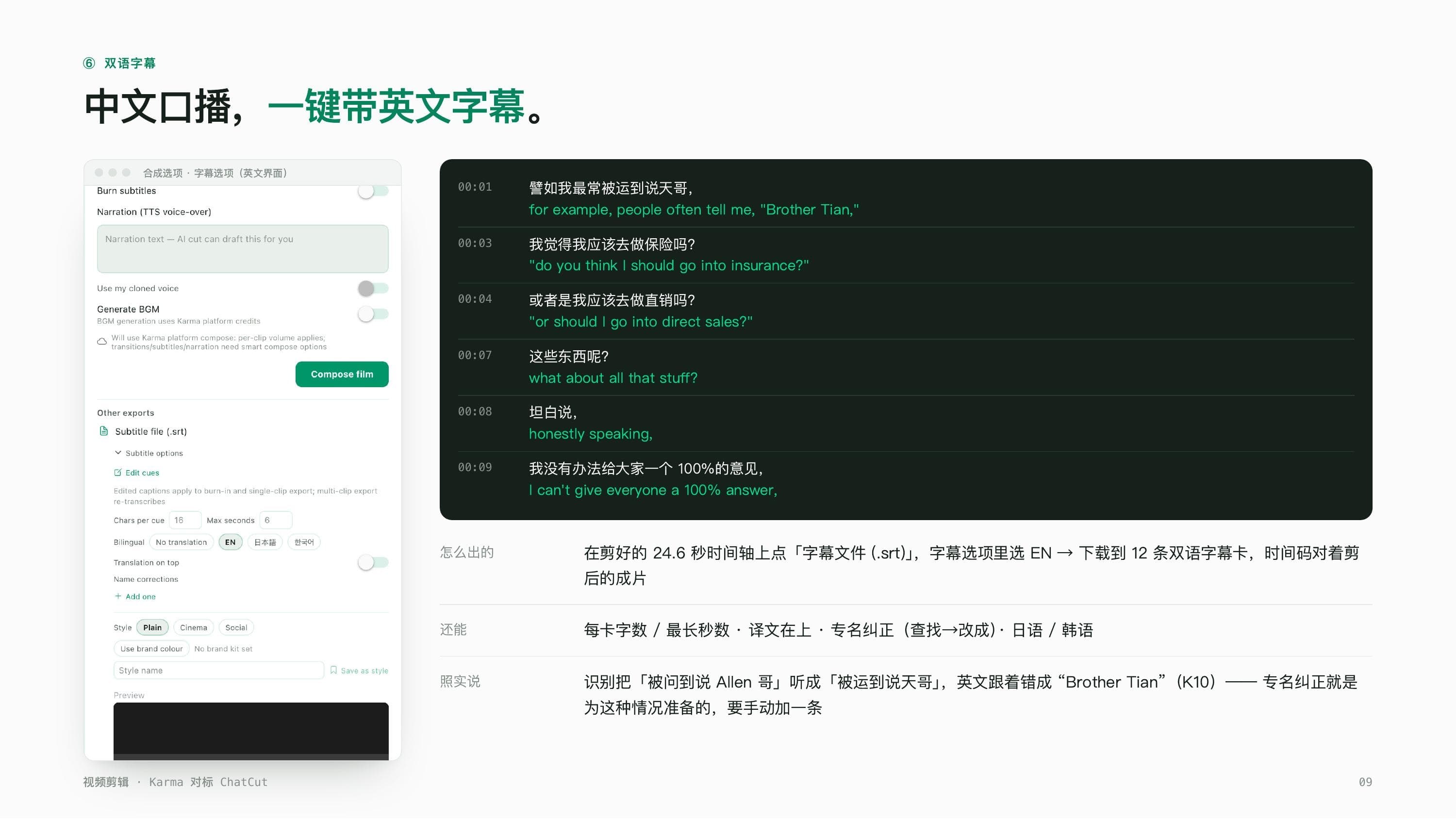
Last step, I typed "for a finished piece, vertical, with chaptered captions, hand it to the recut avatar." About 30 seconds later it produced the finished cut and a bilingual SRT file, 12 lines of captions, neatly paired in Chinese and English, ready to use as-is. One note on compositing: the chat-side editor itself can't output a vertical cut, getting a vertical piece means going through the separate recut avatar path, which we'd tested before on a 90-second source turned into a 65.7-second vertical cut at a clean 1080×1920.
On the table: what Karma adds on top
After finishing this cut, I went back through ChatCut's core chain: word-level transcripts, content-based cutting, multi-track, one-line AI editing, captions, export. Karma has a matching capability for each of those, we're not starting from zero here. What Karma adds on top is editing through conversation and the ability to keep going after the cut, once a piece is edited, you can @ another avatar to pick up distribution or team collaboration from there, a similar relay pattern to what we described in A channel full of avatars, something a one-shot editing tool simply can't do. ChatCut does offer a broad choice of generation models and an open plugin interface for external agents (hooking into Claude Code, for instance), and that's a genuine strength on their side.
On pricing, we're reporting each side's own numbers straight from their respective websites. ChatCut's free tier is 5 credits, with paid plans starting at $50 for 200 credits. Karma bills in a unit called energy, where a single conversation-analysis pass runs about 20 to 30 points, and the recut avatar turning a 90-second clip into a 65.7-second vertical cut ran about 348 points. The two billing units aren't the same thing, so we're not going to force them into one comparable number on a table, we're just putting each side's actual reading here and letting you judge. If you're already running avatars for meeting notes or task dispatch, a bit like the workflow we described in an avatar hands me a checklist in seconds, this editing avatar should slot into the same workflow without needing a separate tool open on the side.
ChatCut is an editor that takes instructions. Karma is a team that can edit.