Running a shop, the scary part was never having a lot going on, it was losing track of it all, whether a piece of marketing material was done, who was handling which poster, what was still missing. We used to rely on someone remembering, and asking for a status update meant waiting while people scrolled back through chat history. Then we moved everything into a Karma workbench project, one called Westside Store, Saturday Tasting, and realized that one question really can get you a real answer.
Open the workbench, and everything running sees daylight at once
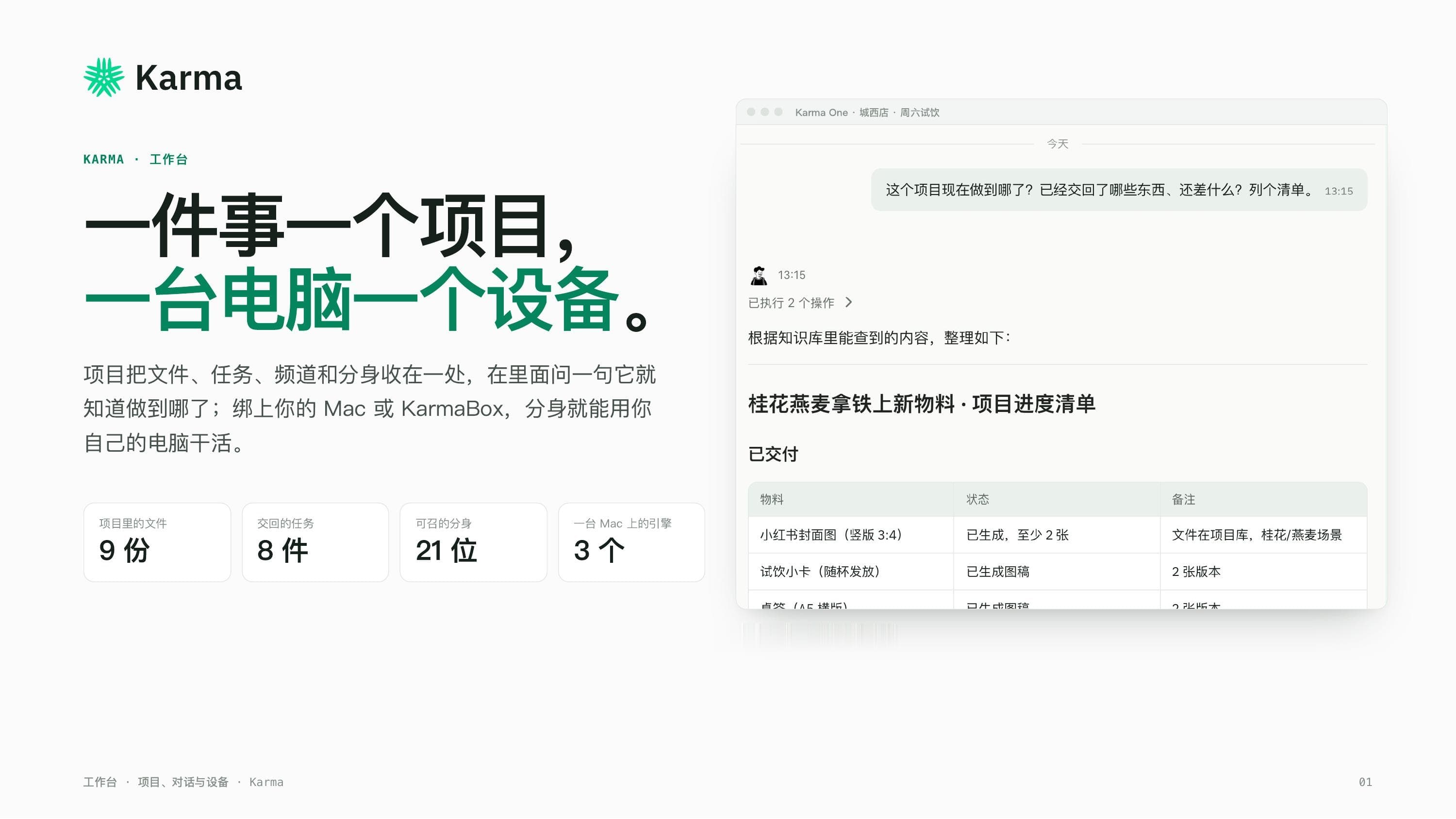
The workbench home page leads with four numbers right up top: 9 files in the project, 8 tasks handed back, 21 avatars ready to call on, 3 engines running on one computer. On the right sits a real exchange, I asked where things stood on this project, what had been delivered, what was still missing, and asked for a list. The avatar went and checked the files itself, then handed back a full progress table, items, status, notes, all laid out clean. Not a vague it's mostly done, but a list I could actually check against reality.
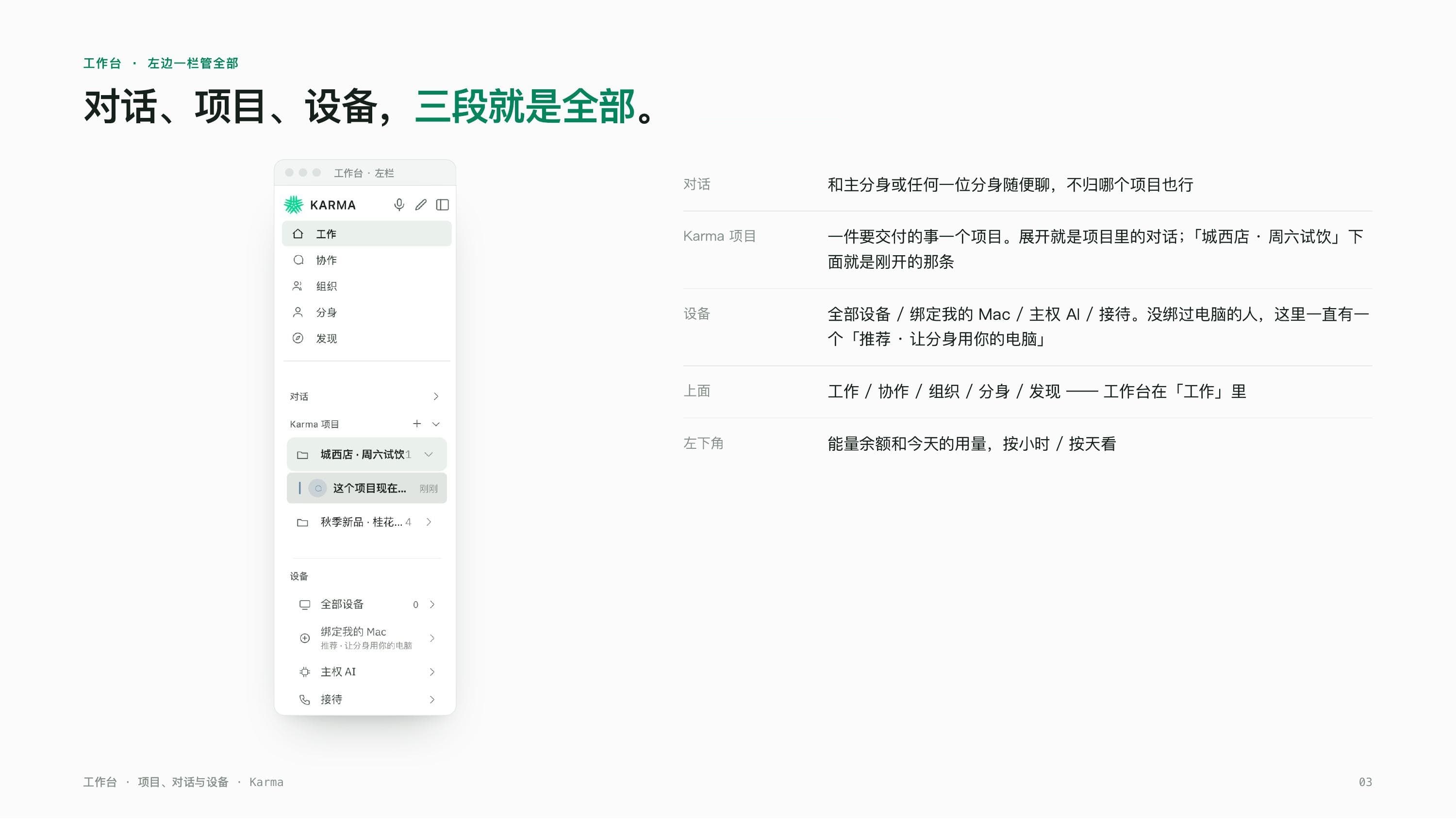
The sidebar has exactly three things: chats, projects, devices — nothing to hunt for
The sidebar has exactly three sections. Conversations are for chatting with any avatar without tying it to a specific project. Karma Projects turns each deliverable into its own project, open one and you see every conversation that belongs to it, the Westside Store project has that exact progress question nested right underneath it. Devices lists the bound computers and other hardware features, and if nothing's bound yet, a standing reminder stays visible until it is. For a small shop juggling several things at once, not having to guess where something lives is worth more than almost any other feature.
Ask where things stand, and it doesn't just report back — it works out the deadlines for you too
This was the one that genuinely surprised me. I gave it zero context, just asked where things stood on this project, what had been delivered, what was missing, give me a list. The avatar checked the project files on its own and came back with a full breakdown, done: the cover image, tasting cards, tabletop signage, and the full supply list, each with exact version counts. Still missing: a launch poster, a menu insert, a social graphic, plus whether the cover image had cleared approval and whether the print order had gone out. What actually caught me off guard was it flagged two deadlines on its own, signage and card designs needing sign-off by Monday, print orders needing to go out by Tuesday, and I never told it either date, it worked both out itself. Then it asked me which gap I wanted filled first.
Four items already delivered on the seasonal-latte supply checklist: the cover image, tasting cards, tabletop signage, and the full supply list — each with its own clear status, not a single vague in progress.
Ask it to use my computer before it's hooked up, and it just tells you it can't yet
What I dread most is the kind of task that looks done but actually accomplished nothing. So I deliberately asked it, before any computer was bound, to open the Westside store's membership sheet on my computer and count new signups this month. It didn't go through the motions, it returned a card straight up: this needs your Mac, waiting on you to bind it, no energy charged, with a three-step setup, download the app, log in, and it connects automatically with no code needed. The explanation was just as direct, it's currently running in the cloud and can't reach local files on my computer, and once the Mac is bound it can open the sheet and count the signups itself, no need to ask again. That willingness to just say it can't do something yet is exactly what makes me trust it with real work.
Bind a computer once, and it has three engines to call on from then on
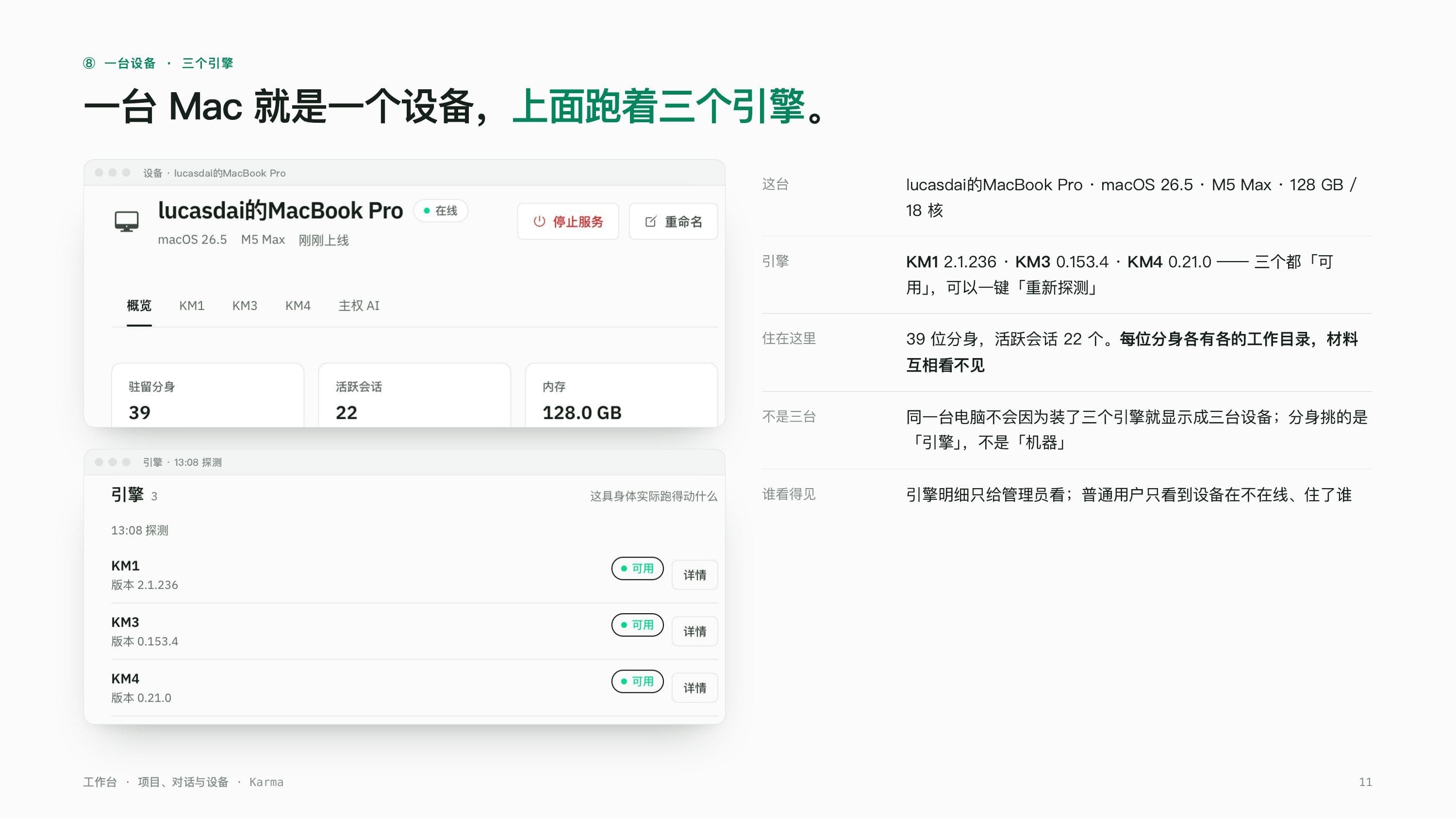
Once bound, the device detail page shows our actual, online MacBook Pro, chip, memory, core count, all laid out clearly. The overview gives three numbers, 39 resident avatars, 22 active sessions, 128 GB of memory in use, with each avatar keeping its own separate workspace so nothing crosses over. Drilling into engine detail shows all three engines running on this machine as available, with one-click re-probing. The genuinely useful part is that this one computer doesn't turn into three separate devices just because it runs three engines, an avatar is choosing which engine to use, not hunting for a machine, and as the shop owner I don't have to think about any of that, it's a glance for whoever manages it.
Now when someone asks where things stand, I don't even bother scrolling the group chat anymore
The biggest change after actually using this is simple: asking where things stand used to mean waiting, now it means getting an answer immediately, checklist and deadlines included. It doesn't bluff when a computer isn't bound, and once it is, whatever was stuck just picks back up without me repeating myself. One project holding files, tasks, and conversations together, one computer bound once and shared across several avatars, that's just how we run things now.