
How many approval tickets does a four-or-more-person team generate in a single week? Expense claims, purchase requests, contract sign-offs, leave and travel requests — at most small businesses, these end up routed by someone shouting "who's supposed to sign off on this" in a WeChat group, or scrolling chat history to find out who approved the last similar request. EOS3 is a real 8-person team: two departments, one reporting line, five approval seats. What follows is a record of the 10 real tickets this team generated in the week of October 21, 2026 — expense claims, purchases, a contract, leave requests, a custom approval — all routed through Karma's company-approvals feature from start to finish, with nobody chasing anyone down to ask who should sign.
Nothing here is a summary with the specifics stripped out — every ticket below includes who submitted it, the exact amount, what the pre-check caught, who asked what, who rejected what, how the money eventually got marked paid, and what archive number it landed on. At the end is the full result of this run — 57 checks, 0 failures — along with an honest account of what this flow doesn't do yet.
Eight people, two departments, five approval seats: how the org chart becomes the approval chain
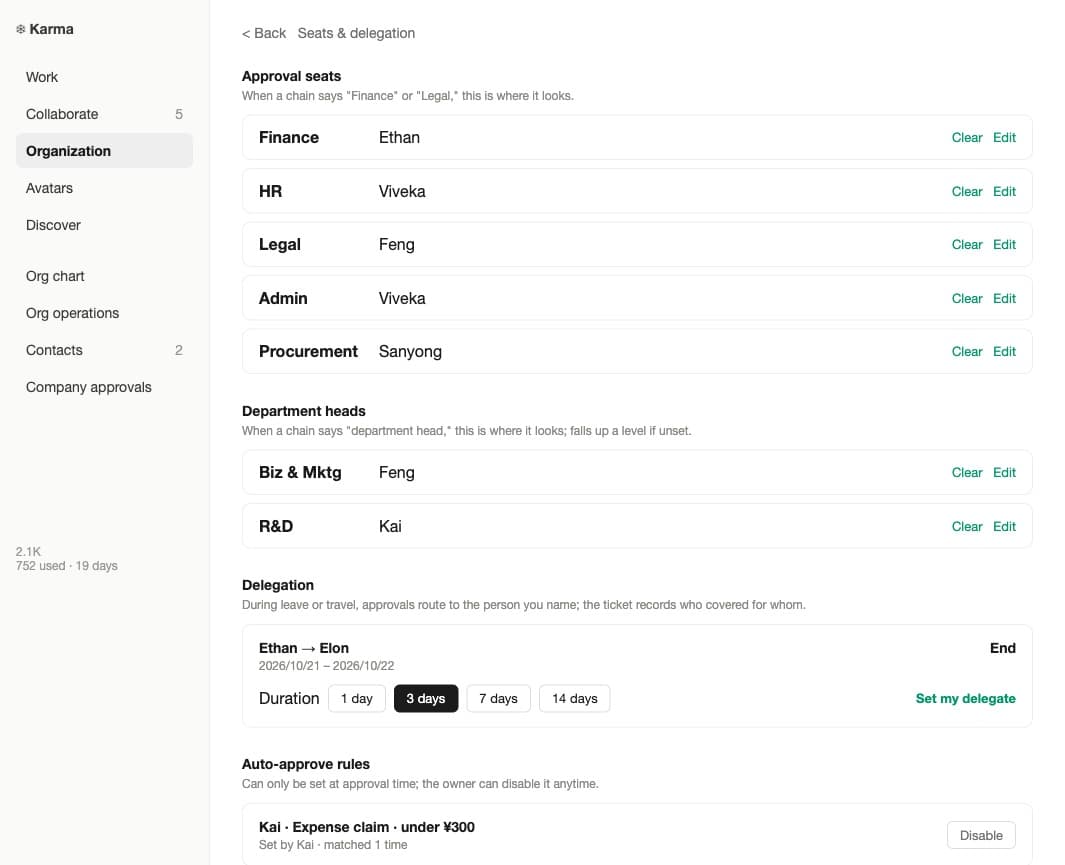
EOS3's team: Elon (owner, the final CEO-approval step); Kai (Karma frontend and servers, R&D lead, reports to Elon); Chao (core algorithms — data, knowledge base, ontology, fine-tuning — reports to Kai); Zilo (inference acceleration and multimodal model optimization, reports to Kai); Sanyong (KarmaBox edge product, reports to Kai, and holds the procurement approval seat); Feng (projects and business development, biz-and-marketing lead, reports to Elon, and holds the legal approval seat); Viveka (marketing, reports to Feng, and holds both the HR and admin approval seats); Ethan (finance and product-quality release, reports to Elon, holds the finance approval seat). Five approval seats — finance, HR, legal, admin, procurement — sit across four of these eight people, with one person (Viveka) holding two. That's the normal state of a small business: more roles than people, and one person routinely wearing several hats.
Karma turns that structure into an executable approval chain: submit a ticket, and the system works out exactly who sits at each step — direct manager, then department head, then finance/legal/procurement/HR/admin — automatically. If the submitter happens to hold the seat for one of those steps, that step auto-skips; nobody ever approves their own request. When someone is on leave or traveling, their approvals route to a named delegate, and the ticket records plainly who covered for whom. Whoever set "the finance seat is Ethan" or "delegate to Elon" is who the chain follows — nobody has to hand-pick an approver every time.
Ticket one: a sentence and a receipt photo fill out the claim by themselves
On Monday, Chao said one sentence — "expense the taxi I took to see a client in Wangjing yesterday" — and attached a photo of the receipt. Karma didn't make him manually pick a claim type, type in an amount, or choose an approver. It read ¥86, the date (October 20), and the invoice number straight off the receipt, then filled in the claim type (travel), the line item, and the approver automatically — Chao just glanced at it and hit submit. There's a hard rule behind this: the amount comes only from the receipt itself and is totaled by code, not calculated or guessed by the model from impression; when a receipt can't be read, the system says plainly "couldn't read the amount on this one, please enter it manually" instead of filling in a plausible-looking number.
This ticket's chain was Kai (Chao's direct manager) → Elon (standing in for Ethan on the finance seat). Kai approved it with a note — "approve this one, finance is still waiting on a second quote for the other thing" — and that note stays on the ticket's history log permanently, not a verbal aside that only exists in someone's memory.
Tickets two and three: the same type auto-passes, but a duplicate still gets caught
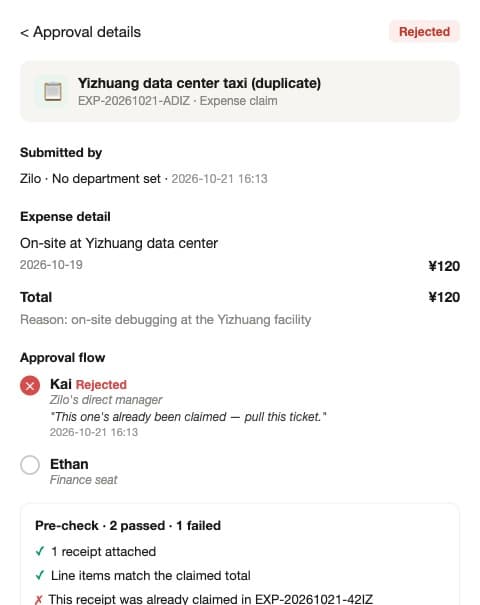
When Kai approved Chao's ticket, he also checked a box: "auto-approve the same type from now on," scoped to R&D department, under ¥300, with pre-checks passing. The next day Zilo expensed a ¥120 taxi ride (on-site to debug an inference cluster at the Yizhuang data center), and Kai's step passed automatically — with the ticket explicitly recording which rule fired. That detail matters: auto-approval isn't an invisible skip. Every auto-pass leaves a trace, and anyone can trace back later exactly who set the rule and on which ticket it applied.
But Zilo accidentally resubmitted the exact same receipt. This time the pre-check flagged it in red: "this receipt was already claimed in EXP-20261021-42IZ." The rule refused to auto-pass it, the ticket routed back to Kai, and Kai rejected it with the note "this one's already been claimed — pull this ticket." This is, to me, the most worth-stating detail in the whole flow: auto-approval and duplicate detection are two separate checks — one asks "does this meet the conditions," the other asks "has this exact receipt appeared before" — and when they conflict, duplicate detection wins. A rule match doesn't mean blind approval.
Ticket four: ask, reject, resubmit — the full back-and-forth stays exactly where it happened
Sanyong needed to buy 200 heatsink modules for ¥38,000, and initially attached only one vendor's quote. Karma's pre-check flagged it first — "purchases over ¥5,000 need two quotes" — a threshold that was already written into the system, not something anyone had to remember to apply. Kai asked a question right on the ticket: "only one quote?" Sanyong answered on the spot, in the ticket itself. When it reached Ethan's step, he wanted a second quote before signing off, and sent it back for revision. Sanyong added a second quote and resubmitted; the ticket landed straight back on Ethan's desk (Kai's step, already approved, didn't need to re-run), the pre-check turned green, and it passed.
Worth noting: Sanyong himself holds the procurement seat, but that step auto-skipped on his own ticket — he can't, and doesn't need to, sign off on his own purchase. From submission through questioning, rejection, resubmission, to final approval, the entire sequence stays on that one ticket in chronological order: submitted → one step skipped (Sanyong himself) → Kai asked a question → Sanyong answered → Kai agreed → Ethan rejected for revision → Sanyong resubmitted → Ethan agreed → approved — nine steps, none of them lost.
Ticket five: a ¥1,200,000 contract, a CEO co-signer, and an automatic archive number
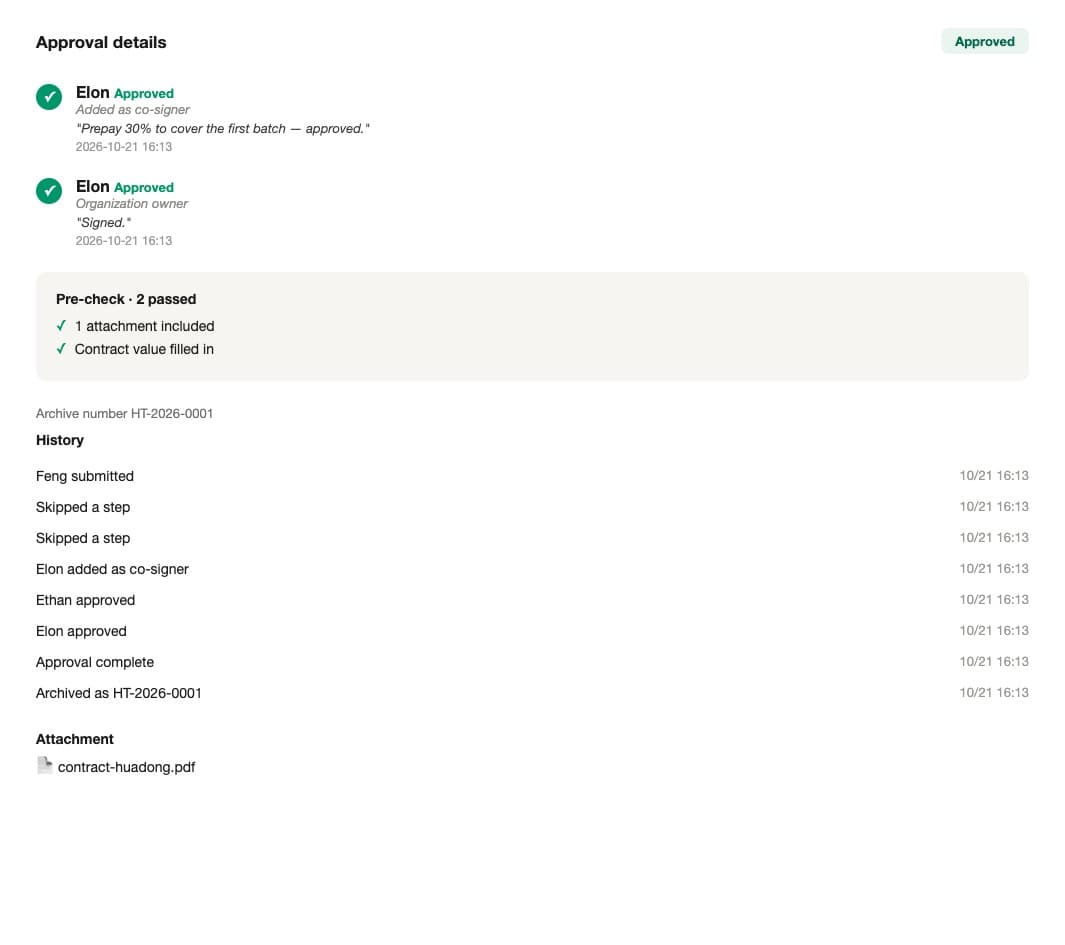
On Wednesday, Feng closed a ¥1,200,000 order — 100 KarmaBox units — for an East China client. Contract approval defaults to legal → department head → CEO, but Feng happens to hold both the legal seat and the biz-and-marketing department-head seat, so both steps auto-skipped and the ticket went straight to Elon. Elon wanted finance to look at the payment schedule first, so he added Ethan as a co-signer ahead of himself; Ethan reviewed it and left the note "prepay 30% to cover the first batch — approved," and once Elon signed, the contract automatically received archive number HT-2026-0001 and filed into the contract archive — a space visible only to legal, the owner, and admins. Nobody else, even knowing the contract amount, can see the contract file itself.
The ticket's full history logs 8 steps: Feng submitted → one step skipped (legal) → one step skipped (department head) → Elon added as co-signer → Ethan approved → Elon approved → approval complete → archived as HT-2026-0001, each step carrying a specific timestamp, with contract-huadong.pdf attached and stored in the contract archive. One thing worth being precise about: Karma currently only assigns an archive number and stores the attachment — it doesn't apply the company seal. That's a separate admin-approval flow handled by whoever holds the admin seat (Viveka), and it isn't connected to an e-signature system yet. That's not a "might get to it eventually" — it's a boundary recorded honestly as of this run.
Tickets six and seven: someone takes leave, the chain doesn't break — and a custom ticket type still finds the right person
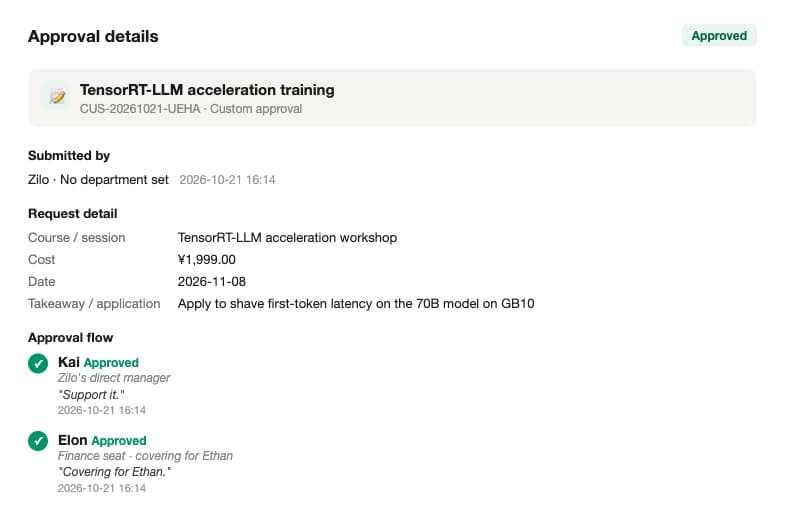
Ethan took a two-day annual leave (October 21–22), and his finance seat automatically delegated to his direct manager, Elon, with a delegation window set to 3 days (1, 7, or 14 days are also options). The ticket is labeled "covering for Ethan" throughout. The same day, Zilo used a custom "training and conference signup" template that Elon himself had built, to expense ¥1,999 for a TensorRT-LLM acceleration training course, noting the takeaway as "apply it to shave another round of first-token latency off the 70B model on GB10." This ticket's chain ran Kai (Zilo's direct manager, noted "support it") → Elon (finance seat, covering for Ethan).
Two things worth pointing out. First, delegation doesn't require anyone to manually edit the approval chain — Ethan going on leave is itself what triggers every subsequent finance-type ticket to route to Elon, including a brand-new custom ticket type created only after Ethan had already left. The system never needs to "wait for Ethan to be back" to process anything. Second, the fields on a custom approval template (course/session, cost, date, takeaway) and its default approval steps are defined by the owner directly in settings, with no need to find a developer to change the underlying system — which matters a great deal for small businesses, most of which have no dedicated system administrator at all.
Tickets eight through ten, and month-end: due payments, the monthly report, and export in one screen
The remaining three tickets: Viveka's ¥5,600 expense claim for trade-show hardware materials in Shenzhen (approved and paid); Kai's travel request for an on-site deployment at a client in Shenzhen (approved); and Ethan's own two-day annual-leave request submitted before he left (approved, and the trigger for the finance delegation described above). By week's end, all 10 tickets — the approved, amount-bearing expense claims, purchases, the contract, and the custom approval — had automatically landed in a "due" queue. After Ethan returned from leave, he processed payment on the taxi claim, the heatsink purchase, and the trade-show materials claim; the remaining invoices and training-course fee were always slated for after his return.
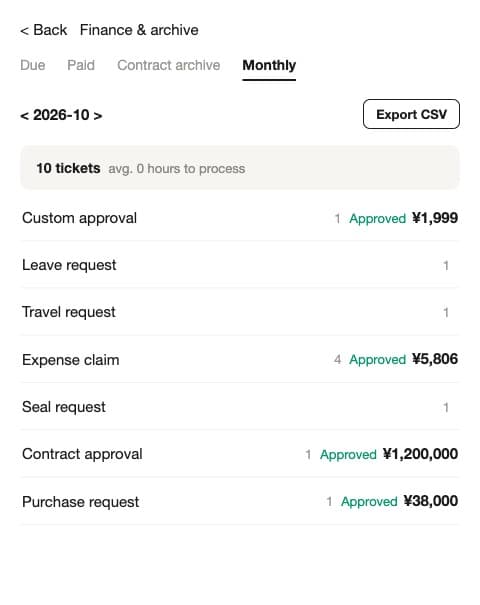
The monthly report auto-totals ticket count and amount by type: 10 tickets total — 1 custom approval (approved, ¥1,999), 1 leave request, 1 travel request, 4 expense claims (approved, totaling ¥5,806), 1 seal request, 1 contract approval (approved, ¥1,200,000), 1 purchase request (approved, ¥38,000). This report was generated by a script in minutes, and the interface literally reads "averaging 0 hours to process" — not a marketing exaggeration, just an honest calculation of processing time. The exported CSV has Chinese headers and status fields throughout, and opens cleanly in Excel with no garbled characters — a detail that, for a fair amount of domestic software, actually needs separate verification rather than being assumed.
Non-finance colleagues can't see this page at all. To be precise: "paid" right now is a status finance marks manually in the system, telling everyone else the money has been handled — the actual bank transfer is still something finance does separately, in their own bank or online-banking session. Karma doesn't have a payment integration wired into this step, the same honest caveat as contract archiving not being connected to e-signature — stated plainly rather than implied otherwise.
Only the people who need to know, know: what's actually in each of the 8 inboxes
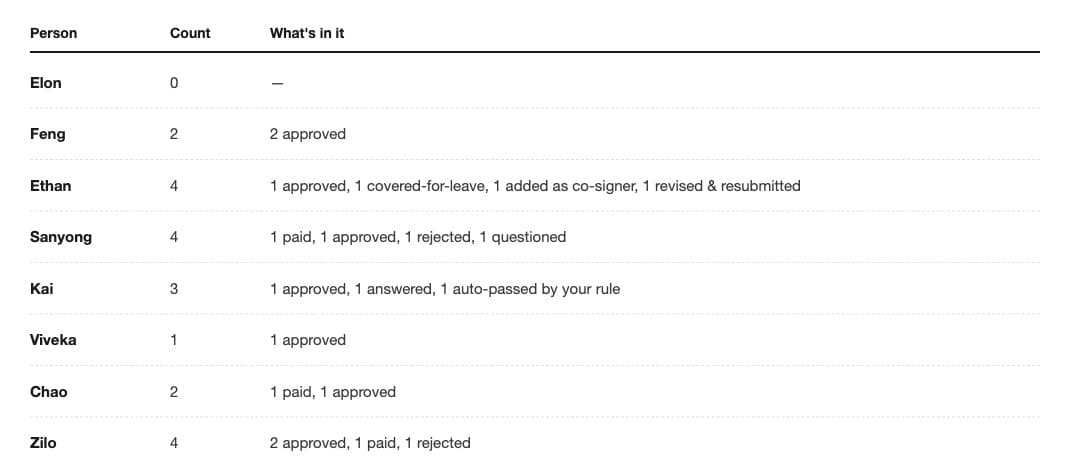
The whole week produced 10 tickets across 8 people. A ticket waiting on your decision goes into a separate "your call" queue — it never clutters the inbox. The inbox only carries results that directly concern you: your ticket got questioned, rejected, approved, or paid, or a rule you set auto-approved one on your behalf. Elon, who spent the week approving other people's tickets, ended up with zero approval notifications in his own inbox — he's the one doing the approving, not the one waiting on an outcome, and the system doesn't flood him with "processed" confirmations just because he approved a lot. By contrast, Sanyong's purchase ticket went through four stages — questioned, rejected, approved, paid — and his inbox shows exactly one entry for each, matching that ticket's history precisely.
The table below is the complete record of inbox entries per person that week: Elon, 0; Feng, 2, both "approved"; Ethan, 4 — 1 approved, 1 covered-for-leave, 1 added as co-signer, 1 revised and resubmitted; Sanyong, 4 — 1 paid, 1 approved, 1 rejected, 1 questioned; Kai, 3 — 1 approved, 1 answered, 1 auto-passed by his own rule; Viveka, 1; Chao, 2; Zilo, 4. What lands in each person's inbox maps exactly to what they actually did that week — submitter, approver, delegate, or rule-setter — rather than a broadcast everyone gets the same copy of.
What isn't built yet — stated plainly
The production-database tables for this flow are already built, but the feature itself ships with the next production release — it isn't something you can use in production today. "Paid" is a manual status finance sets by hand; it isn't wired to a bank or online-banking integration yet, so the actual transfer is still something finance does themselves. Contract archiving currently only assigns a number and stores the attachment; it isn't connected to e-signature, and getting the company seal applied runs through a separate admin approval. Voice-to-text transcription was paused at the time of this run because the voice vendor's certificate expired on October 21 — meaning the "say a sentence to start an approval" entry point wasn't usable via voice recognition at that moment, only by typing or photo upload. None of this is a vague "might build later": these are the exact limits recorded honestly during this run, so a team actually adopting this flow knows upfront where they still need a human in the loop.
Can Karma's approval flow automatically trigger a bank payment?
Not at the moment. "Paid" is a status finance marks manually in the system to tell colleagues the money has been handled; the actual transfer still happens separately through finance's own bank or online-banking session. Karma doesn't have a payment integration wired into this step — a boundary recorded explicitly during this run, not an undisclosed gap.
Could someone's auto-approve rule let a ticket that should be caught slip through unnoticed?
No — duplicate detection takes priority over auto-approve rules. In EOS3's case, Kai set a rule (R&D department, under ¥300, auto-approve), but when Zilo accidentally resubmitted the same receipt, the pre-check flagged it as a duplicate first, the rule refused to pass it, and the ticket still routed back to Kai for a human call. A rule can only be set by the approver at the moment they approve, any owner can disable a rule someone else set at any time, and the ticket always records exactly which rule fired — never an invisible skip.
If someone on the team goes on leave or leaves the company, does the approval chain break?
Not during leave — in EOS3's case, Ethan's two-day leave automatically delegated his finance seat to his direct manager, Elon, with the ticket labeled "covering for Ethan," and even a brand-new custom ticket type created during that window routed correctly. Delegation windows can be set to 1, 3, 7, or 14 days and end automatically. For a longer-term change (someone leaving the company, for instance), the owner needs to manually reassign the corresponding approval seat to someone new — the system doesn't leave approval authority sitting indefinitely with someone no longer in the role.
Does contract archiving include e-signature?
No. Contract archiving does exactly two things: assign an archive number to an approved contract and store its attachment, visible only to legal, the owner, and admins. Applying the company seal is a separate admin-approval flow, handled by whoever holds the admin seat, and there's no e-signature system connected to it yet. EOS3's ¥1,200,000 contract got archive number HT-2026-0001, but sealing it ran as its own separate approval, outside the archiving flow.
Without a dedicated IT person, is a custom approval template hard to set up?
No developer involvement needed. In EOS3's case, Elon built a custom "training and conference signup" template himself in settings, defining its fields (course/session, cost, date, takeaway) and default approval steps — Zilo was able to use it the same day, and the system still computed the correct approver (including Elon, who happened to be covering for someone on leave at the time). Fields and steps on a template can be edited by the owner at any time, with no need to find a developer to change the underlying system.
Build a sovereign AI avatar that answers only to you
The machine is yours, the files are yours, and so is the memory — it lives in a file you can take with you. What it may and may not touch is your call. The KarmaBox web client needs no install.
Try Karma Web →