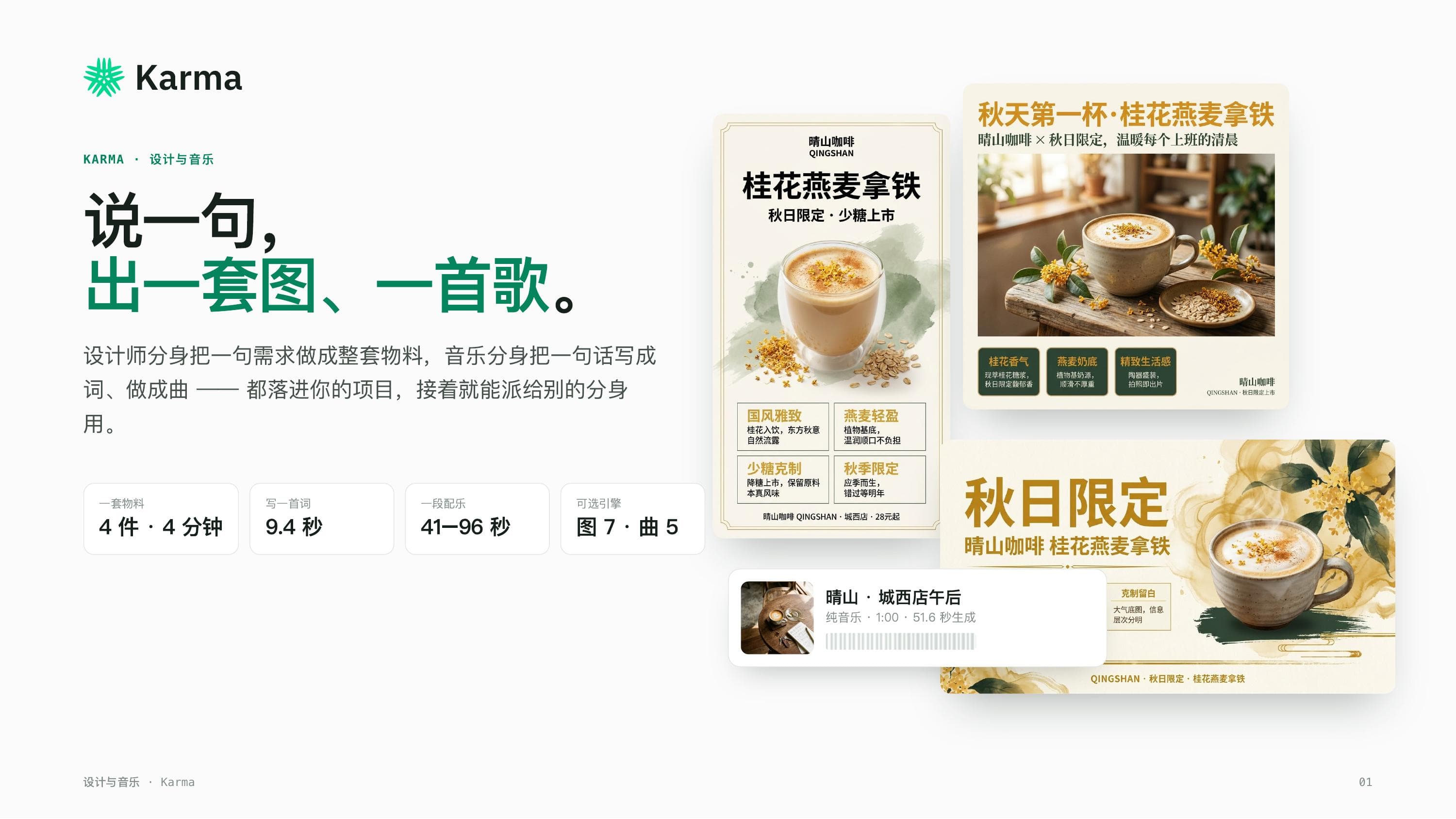
I run a small coffee shop in the west side of the city, Qingshan Coffee. This autumn we're launching an osmanthus oat latte. The drink itself isn't the hard part — the hard part is everything around the launch: a poster, a menu insert card, a Xiaohongshu cover, a storefront standee, plus a new seasonal background track for the shop and a short-video score that actually hits on beat.
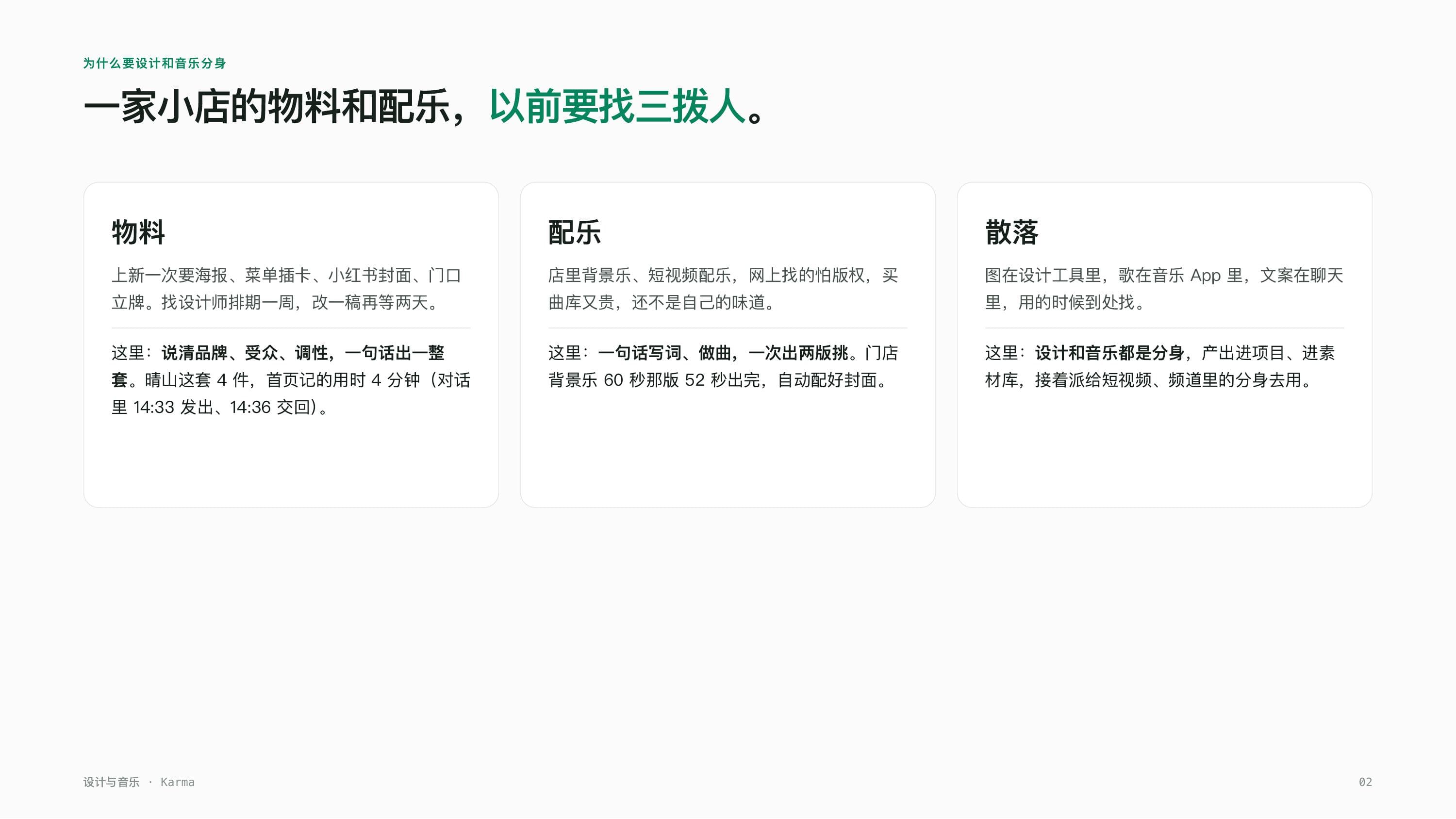
Here's how I used to handle this: find a designer I knew, book at least a week out, wait two more days for a revision, and the whole set would usually land the day before launch, if I was lucky. Music was worse — pulling something off the internet risked a copyright complaint, and a licensed track from a stock library ran several hundred yuan a song, and it still often didn't match the shop's tone. Warm, sure, but not "Qingshan" warm. What made it worse was that everything lived in three different places: the images in a designer's cloud drive, the song under some stock-library account, the notes and copy buried in a chat thread — so actually using any of it meant ten minutes of scrolling first.
1. This time, I decided to let an avatar handle it
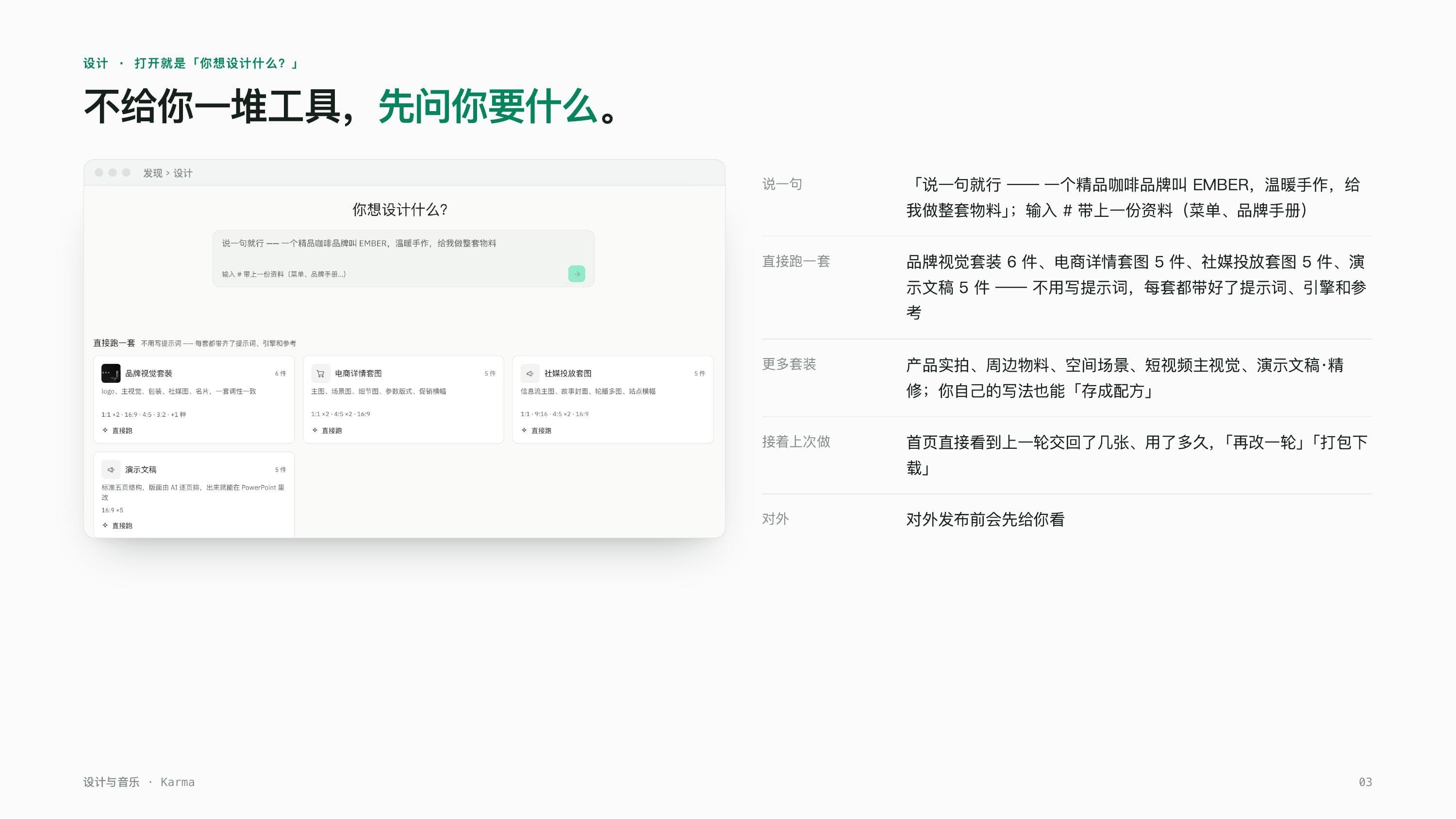
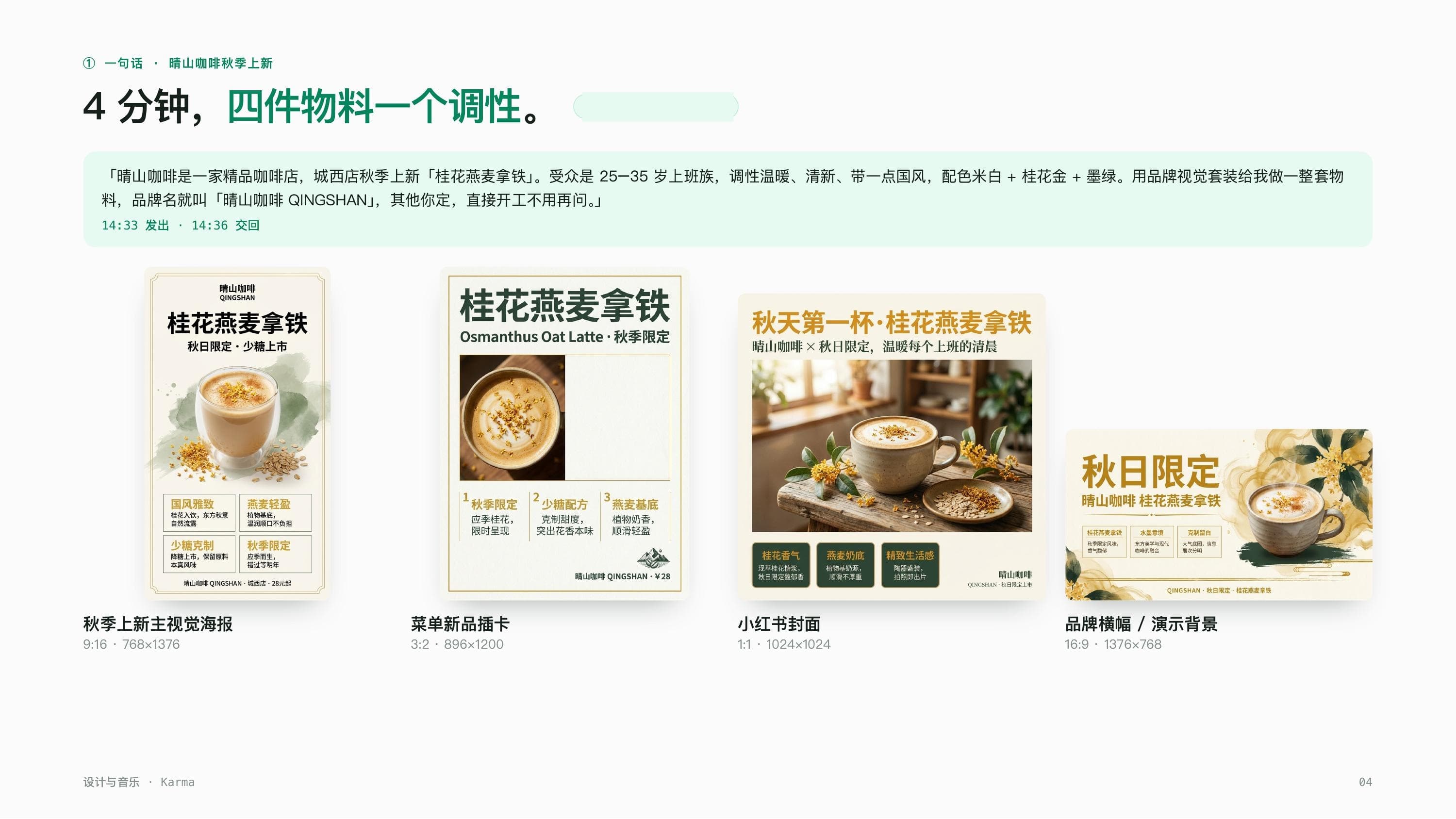
Three days before the launch, I opened the Design avatar inside Karma. It didn't throw a toolbar and a template library at me — just one input box, asking a single question: what do you want to design? I typed a real request: "Qingshan Coffee is a specialty coffee shop. The Chengxi location is launching an autumn Osmanthus Oat Latte. The audience is 25-35-year-old office workers, warm and fresh in tone with a touch of guofeng style, color palette of off-white plus osmanthus gold plus deep green. Use the brand visual kit to make me a full set of materials. The brand name is 'Qingshan Coffee QINGSHAN' — you decide the rest, just start, no more questions." You can type # next to the input box to attach a reference file, like a menu or brand guide — but this time I gave it nothing else, just that one sentence.
I didn't expect it to actually understand what shade "osmanthus gold" meant, and I didn't expect it to reconcile something as oddly specific as "guofeng style" with "office workers" — but it did.
2. Say one sentence, skip the prompt-writing, and run a bundle
This is the moment I realized this wasn't like any AI design tool I'd used before. With a typical AI design tool, you write your own prompts, pick your own aspect ratios, generate one image at a time, and the style often doesn't match across pieces anyway. Karma's Design avatar swallowed that whole step: say one sentence, skip the prompt-writing, and it showed me several ready-to-run bundles — a 6-piece brand visual kit, a 5-piece e-commerce detail set, a 5-piece social-ad set, a 5-piece slide deck — each one already carrying its own prompts, engine, and references, nothing left for me to configure. More bundles covered product photography, merchandise, space/scene renders, short-video key visuals, and a polished slide deck — more scenarios than I expected.
I tapped the brand visual kit. The home screen shows how many pieces came back last round and how long it took, with a tap to "revise again" or "package and download." A phrasing that worked well can be "saved as a recipe" for next time, so I won't have to re-describe the brand's tone from scratch at the next launch. And before anything goes out publicly, it shows me first — nothing ships on its own before I've signed off.
3. Four minutes later, four pieces were in front of me — one consistent look
After typing that sentence, I sat there waiting, honestly without high expectations — descriptions like "guofeng," "warm," "osmanthus gold" are so subjective that if I'd given the same brief to three different designers, I might have gotten three completely different results. Four minutes later, all four pieces came back: an autumn-launch key-visual poster (9:16), a menu insert card (3:2), a Xiaohongshu cover (1:1), and a brand banner/presentation background (16:9).
What genuinely surprised me was that the palette, typeface, and composition ran through the whole set as one consistent look — not four images that each looked fine on their own but clashed when placed together, but a full set of brand materials you could recognize as "Qingshan Coffee" at a glance. That's exactly the problem I used to dread most with designers: three rounds of revisions in, and the poster's typeface still wouldn't match the menu card's.
4. It lands on a canvas, and every piece can be revised on its own
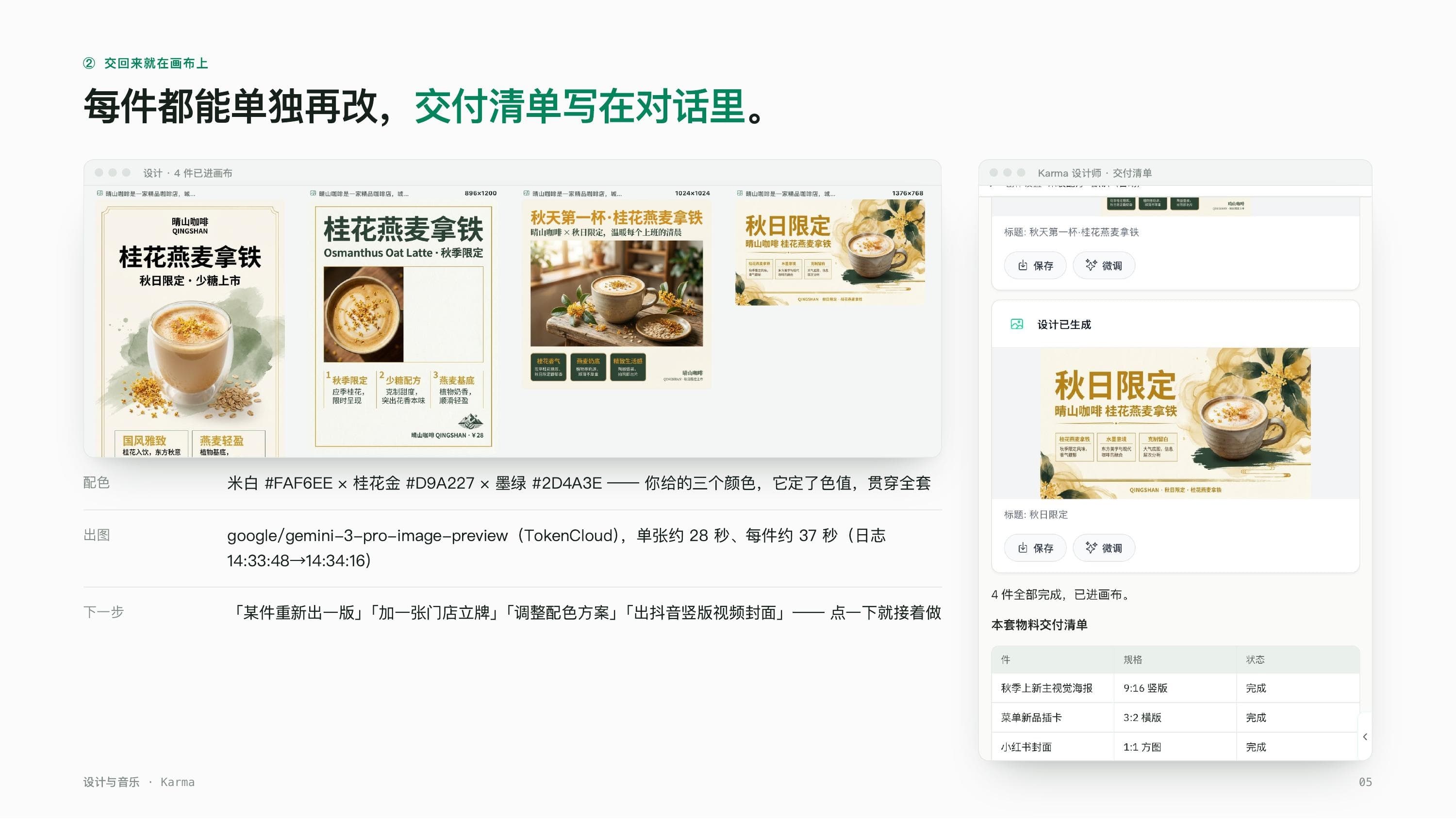
The four pieces didn't just land as four flat images and that was it — they went straight onto a canvas, with a delivery checklist written right into the chat: the exact color values used, which model generated the images, how long each one took. I did end up wanting a storefront standee added and the poster's palette lightened slightly — one tap, and it kept going, no need to redo the whole set.
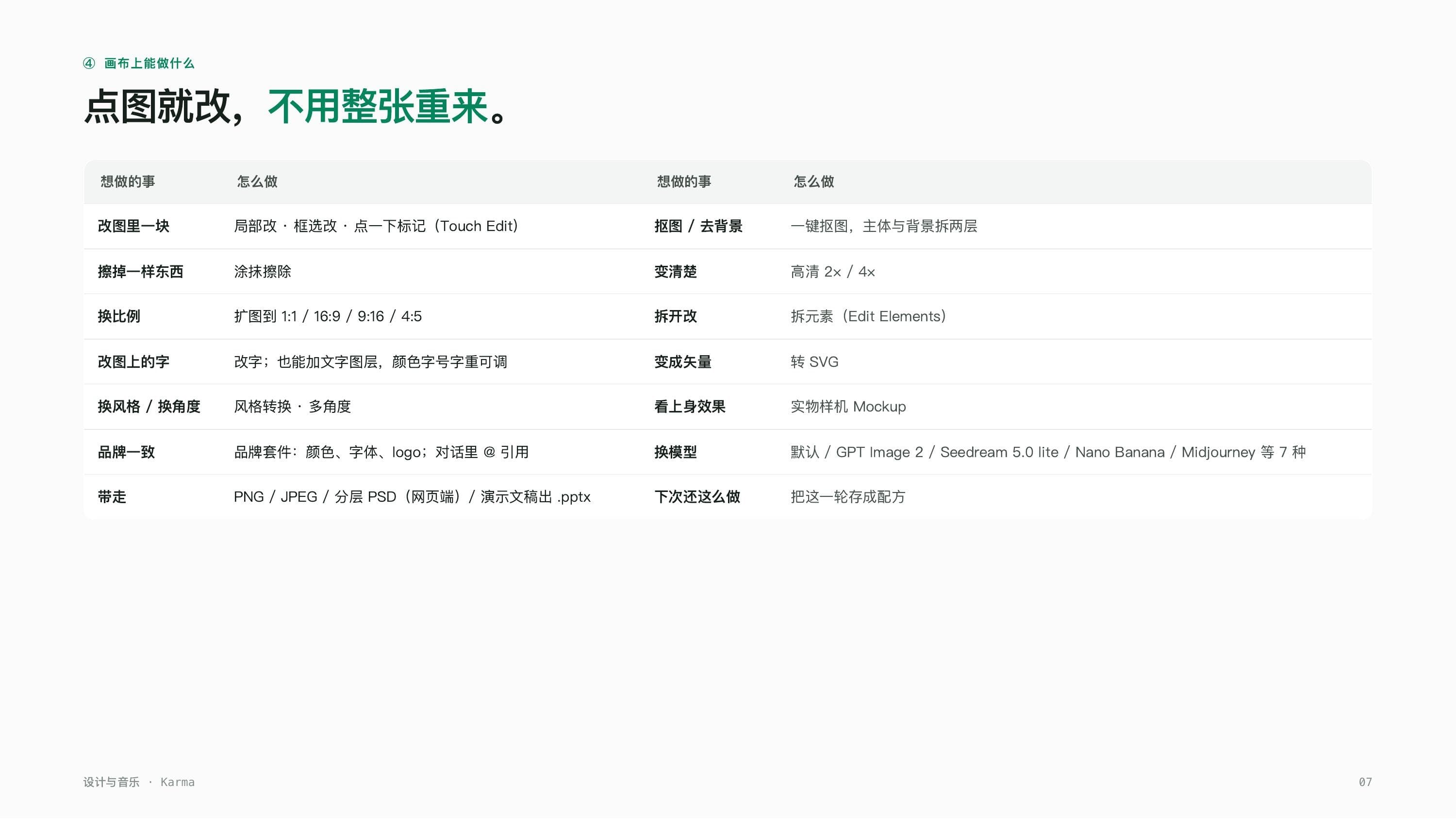
What you can do on the canvas goes beyond "regenerate." Touch-edit a section, erase an element, expand the canvas to 1:1/16:9/9:16/4:5, edit the text on an image, switch style or angle, cut out the subject from its background, upscale to 2x/4x, pull elements apart and adjust them individually, convert to vector SVG, or drop the design onto a product mockup to see how it looks in the real world. Reference your brand kit's colors, type, and logo by @-mentioning it in the chat, so the whole set stays on-brand. Switching models isn't limited to one option either — beyond the default engine, GPT Image 2, Seedream 5.0 lite, Nano Banana, Midjourney, and three more are all selectable. Exports come as PNG/JPEG, layered PSD (web), or a .pptx slide deck. This is when it clicked for me what "one-click brand materials" should actually mean — not spitting out one image and calling it done, but a full set you can keep refining the way you would in a real design tool.
A real recording of the Design avatar: the user says just one line — "Qingshan Coffee's autumn Osmanthus Oat Latte launch, here's the brand, audience, tone, and colors, make me a full set" — and the interface immediately moves into running a bundle
5. I tried it again — this time, deliberately leaving things vague
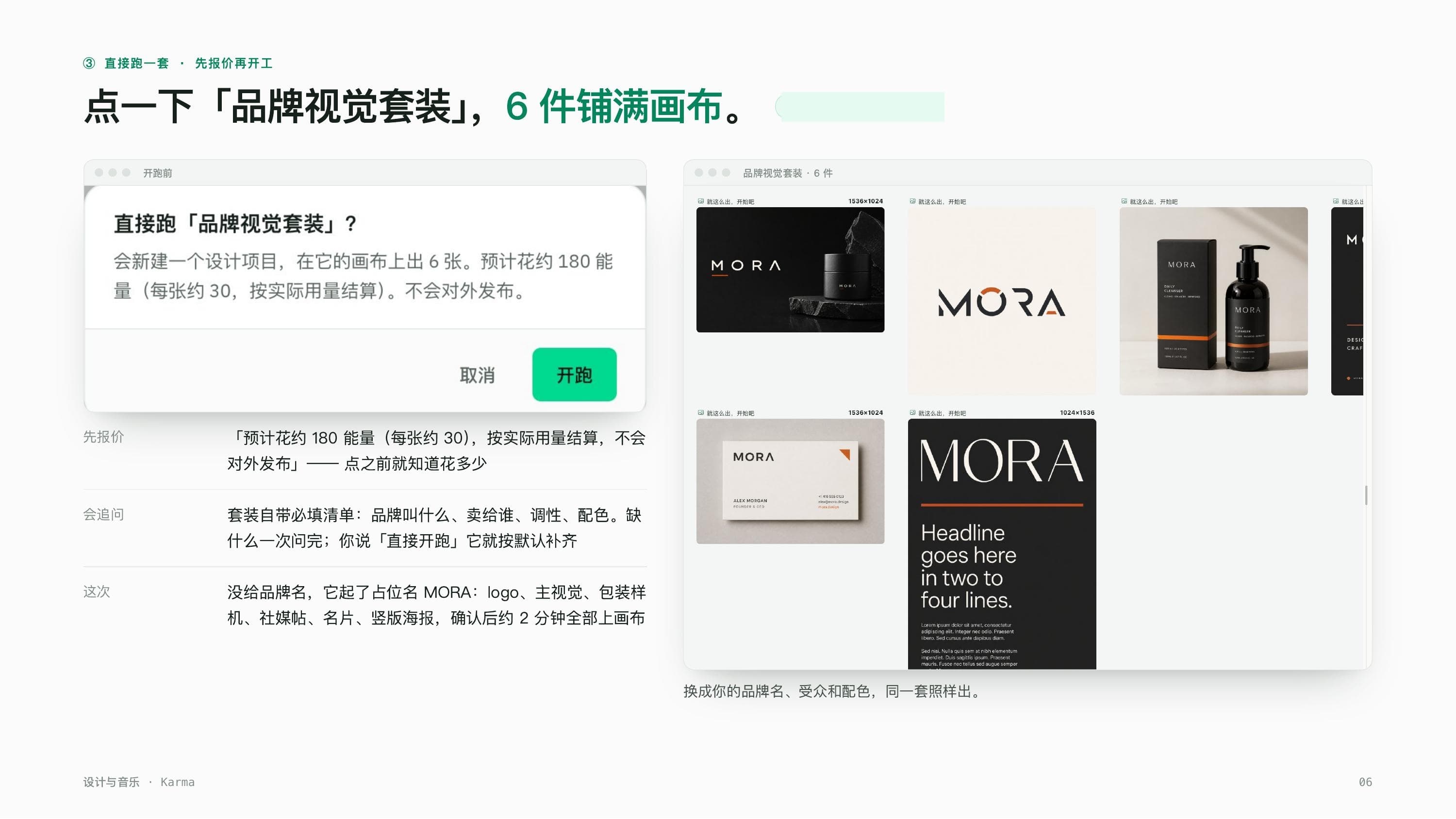
The first run went smoothly, which made me suspicious it was just luck — maybe my description happened to be specific enough. So I tapped "brand visual kit" and ran it again, this time deliberately withholding a brand name, just to see how it would handle an incomplete request. Running a bundle directly quotes you the cost before it starts: "roughly 180 energy expected (about 30 per image), billed by actual usage, nothing goes public" — so you know the cost before you commit. Every bundle carries a required checklist: brand name, target audience, tone, palette — whatever's missing, it asks for all at once; I said "just run it," and it filled the gaps with sensible defaults. It invented a placeholder brand, MORA, and delivered a logo, key visual, packaging mockup, social post, business card, and vertical poster — all landing on the canvas in about two minutes after confirmation. Swap in your own brand name, audience, and palette, and the same bundle runs just as well.
6. Click the image, edit it — no need to start over
This capability list covers pretty much every everyday image-editing scenario: edit a section with Touch Edit by boxing and marking it; erase something by painting it out; expand the canvas to 1:1/16:9/9:16/4:5; edit text directly on an image, or add a new text layer with adjustable color, size, and weight; switch style or angle; keep brand consistency by @-referencing the colors, type, and logo from your brand kit. On the other side: cut the subject from its background in one click; sharpen with 2x or 4x upscaling; pull elements apart into separate layers and adjust them individually (Edit Elements); convert to vector SVG; drop the design onto a real-world mockup to preview it; switch models among seven options beyond the default, including GPT Image 2, Seedream 5.0 lite, Nano Banana, and Midjourney; export as PNG/JPEG, layered PSD (web), or a .pptx deck; and if this round turned out well, save the whole configuration as a recipe for next time.
The materials problem was solved. But a launch is never finished with just a poster — I still owed the shop a background track and the short video a score, and that was always the part I dreaded most.
7. Music was the part where I'd actually been burned before
A poster can wait, but background music can't — when we first opened, I used a free instrumental track pulled off the internet, then got a warning that its copyright status was unclear and scrambled to swap it out. I replaced it with a track from a licensed stock library, which ran several hundred yuan and, worse, sounded like generic background music — the kind that could be playing in anyone's shop, with none of Qingshan's own character. For this launch, I wanted to see whether AI music generation could actually hold up.
8. The Music avatar: say what you want on the left, your library sits on the right
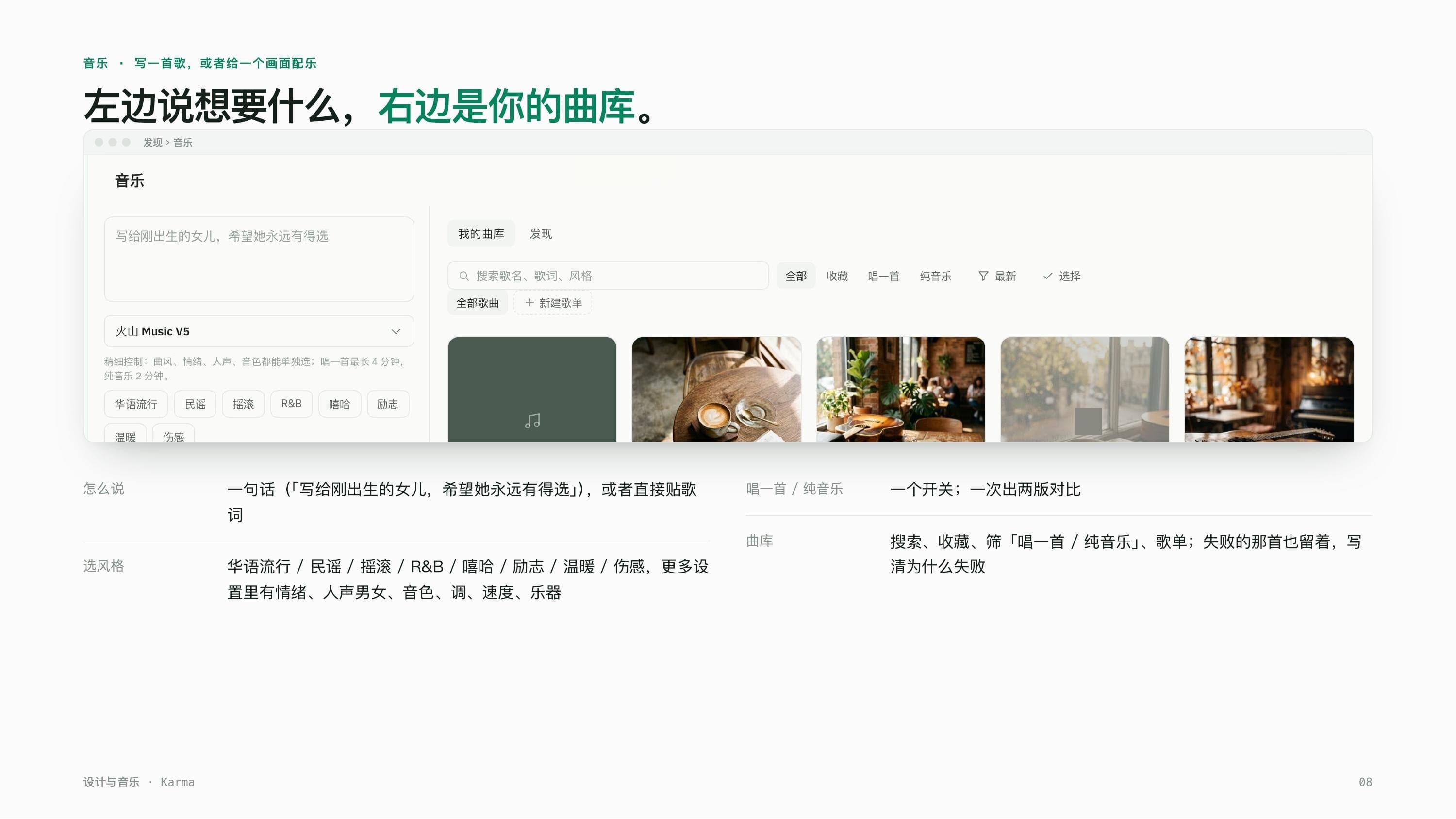
The Music avatar's job is "write a song, or score a scene." The interface is split evenly in half: on the left, describe it in one line — "written for my newborn daughter, so she always has choices" — or paste lyrics directly; pick a genre (Mandopop, folk, rock, R&B, hip-hop, motivational, and more settings for mood, vocal gender, timbre, key, tempo, instrumentation). You can choose the Volcano Music V5 engine for fine-grained control over genre, mood, vocals, and timbre individually — a song with vocals runs up to 4 minutes, instrumental up to 2. The right side is your library: "My Library" and "Discover" tabs, searchable by title, lyrics, or genre, filterable by "vocal/instrumental" or playlist, with a "new playlist" button next to "all songs" for organizing. "Vocal/instrumental" is a toggle that can generate two versions at once for comparison; even the version you don't keep stays saved, with notes on why it didn't work, so the next attempt can improve on it. This is what I think AI music generation should actually feel like — not a single roll of the dice, but a process you can compare and revise again and again.
Behind the Music avatar isn't one single engine — there are five to choose from: Volcano Music V5 (public cloud), MiniMax Music 3 (self-hosted GPU), ACE-Step 1.5 (self-hosted GPU), Mureka V8 (public cloud, via LibTV), and Eleven Music V3 (public cloud, via LibTV). Two run on self-deployed GPUs, three run on public cloud — pick the engine that fits the scene.
9. I tried AI lyric-writing — one sentence, 9.4 seconds to a finished lyric
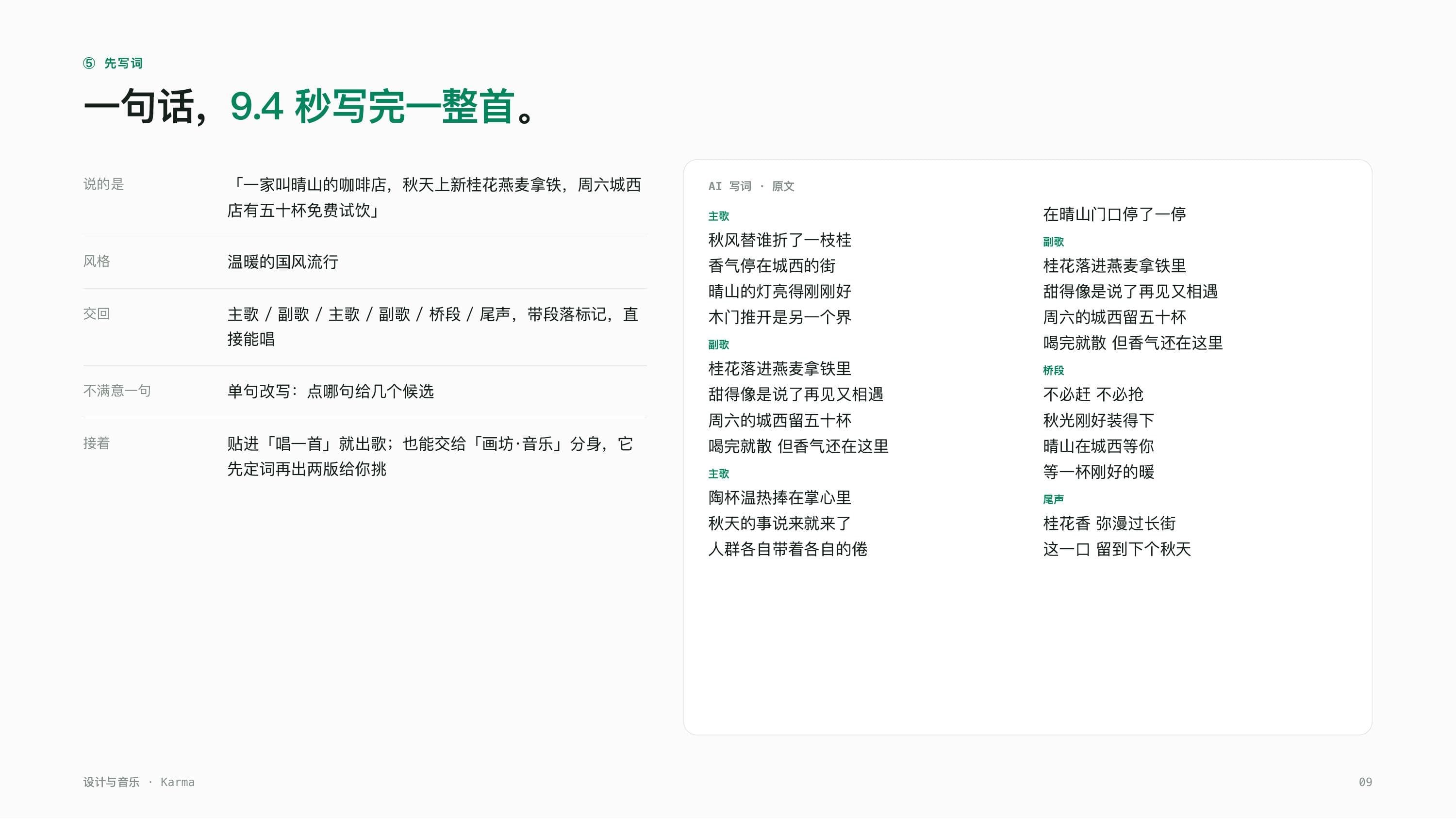
I typed one sentence, half-expecting little more than a few rhyming filler lines: "a coffee shop called Qingshan, launching an osmanthus oat latte this autumn, fifty free tasting cups at the Chengxi location on Saturday," with a warm guofeng-pop style selected. What came back instead was a full verse/chorus/verse/chorus/bridge/outro structure, labeled by section and ready to sing. The verse: "Autumn wind, who broke off this branch of osmanthus / its scent lingers on the Chengxi street / Qingshan's lights glow just right / push the wooden door, and it's another world." The chorus: "Osmanthus falls into the oat latte / sweet like saying goodbye and meeting again / fifty cups saved for Saturday in the west of town / once they're gone, the scent still lingers." The bridge: "No rush, no scramble / autumn light is just enough to hold / Qingshan waits for you in the west of town / waiting for one cup of just-right warmth." The outro: "Osmanthus scent drifts down the long street / this one sip, saved for next autumn." Where a line didn't land for me, I could rewrite just that line — tap it and get a few alternatives, no need to tear down the whole lyric. Paste the finished lyrics into "sing it" and a song comes out directly, or hand it to the Studio · Music avatar, which locks the lyrics first and then delivers two versions to choose between.
10. The part that actually solved my problem: four AI-generated scores, each delivered in under a minute
The lyrics were a pleasant surprise, but the pain point I actually needed solved was the music — background audio for the shop and a short-video score, always the thing I least wanted to pay for and most likely to land me in a copyright dispute. I ran four pieces through the same Music avatar: "Osmanthus Afternoon," a 30-second instrumental generated in 59.2 seconds — a warm autumn café mood, acoustic guitar and soft piano, a lazy afternoon. "Qingshan · Chengxi Store Afternoon," a 1-minute instrumental — the same prompt, "store background music," generated two versions for comparison at once, one in 51.6 seconds and one in 95.6 seconds: a specialty-coffee-shop afternoon mood, acoustic guitar and Rhodes electric piano, light jazz bossa nova, warm and unhurried, suited for looping in-store — I picked the version I liked. And "Osmanthus Launch · Short-Video Score," a 30-second instrumental generated in 41 seconds — a Xiaohongshu short-video score, upbeat guofeng electronic with guzheng accents, a punchy, memorable rhythm that hits its chorus within 15 seconds, right where the "golden three seconds" rule for short video needs a hook to land. The cover art was generated at the same time, with no separate step for me to do. Add it up, and four pieces of music that belonged entirely to Qingshan took less than four minutes of generation time combined — faster than I used to spend just browsing a stock library.
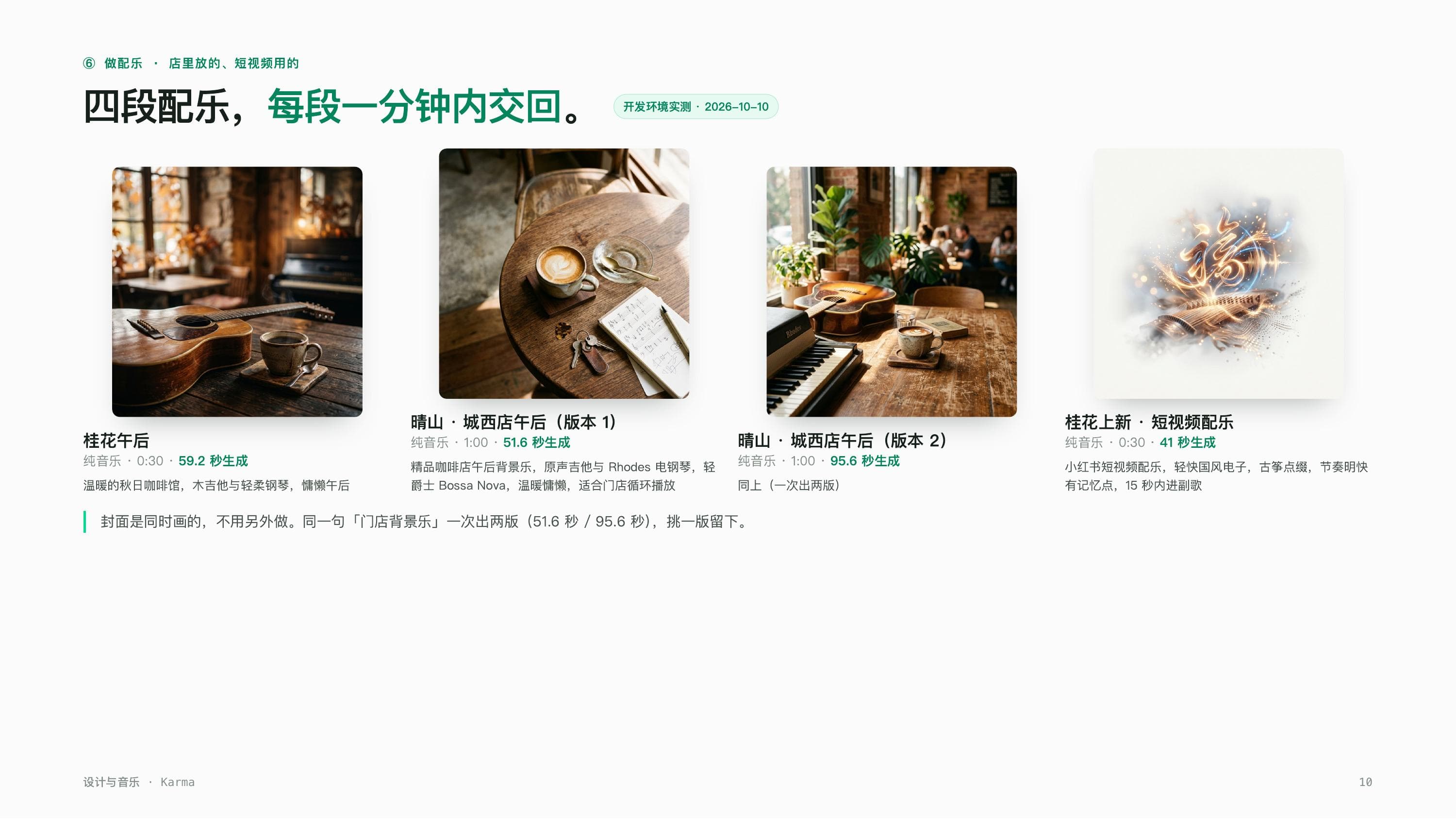
A real recording of the Music avatar: the user asks for "one more piece of background music for the same shop" — specifying a café-afternoon mood, acoustic guitar plus electric piano, suited for looping in-store
11. Trim, tweak, swap the cover — I wasn't happy on the first try, but every step saved as a new track
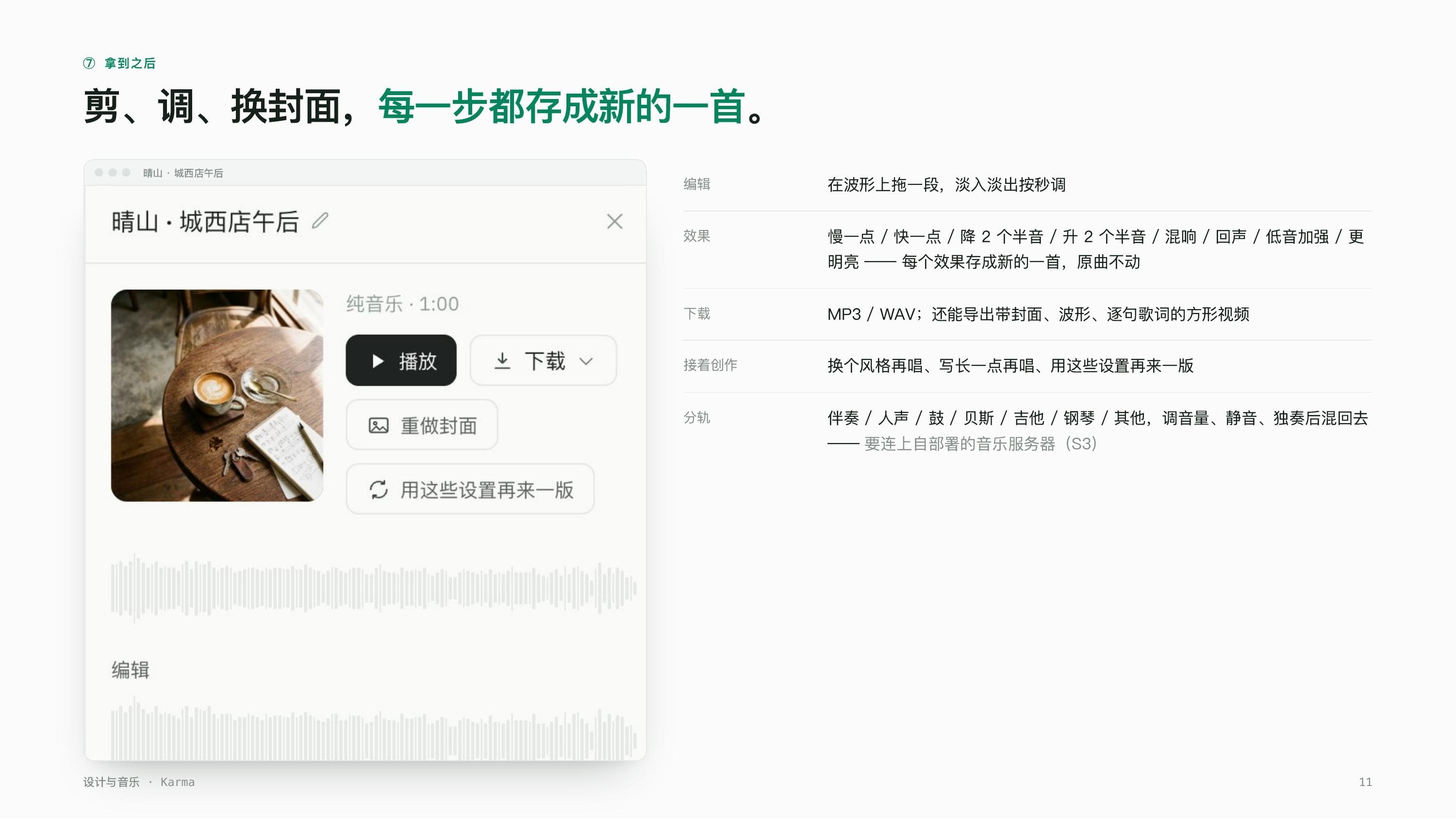
Honestly, the first time I listened to the "Qingshan · Chengxi Store Afternoon" track, the tempo felt a touch slow for the lunch rush. Once you have a song or score, editing means dragging a section on the waveform and adjusting fade-in/fade-out by the second. Effects include slow down, speed up, drop 2 semitones, raise 2 semitones, reverb, echo, bass boost, and brighten — each effect saves as a new track, leaving the original untouched, so I could try anything without risking the original version. Downloads support MP3/WAV, plus a square video export with cover art, waveform, and line-by-line lyrics baked in — ready to post straight to Xiaohongshu or a video channel. From there you can keep creating: redo it in a different style, write a longer version, or run another take with the same settings. Stem separation goes further still: accompaniment, vocals, drums, bass, guitar, piano, and other — adjust volume, mute, or solo each one, then mix it back together. This one requires connecting to a self-deployed music server.
12. While I was at it, I shared the finished track — one link, no login needed
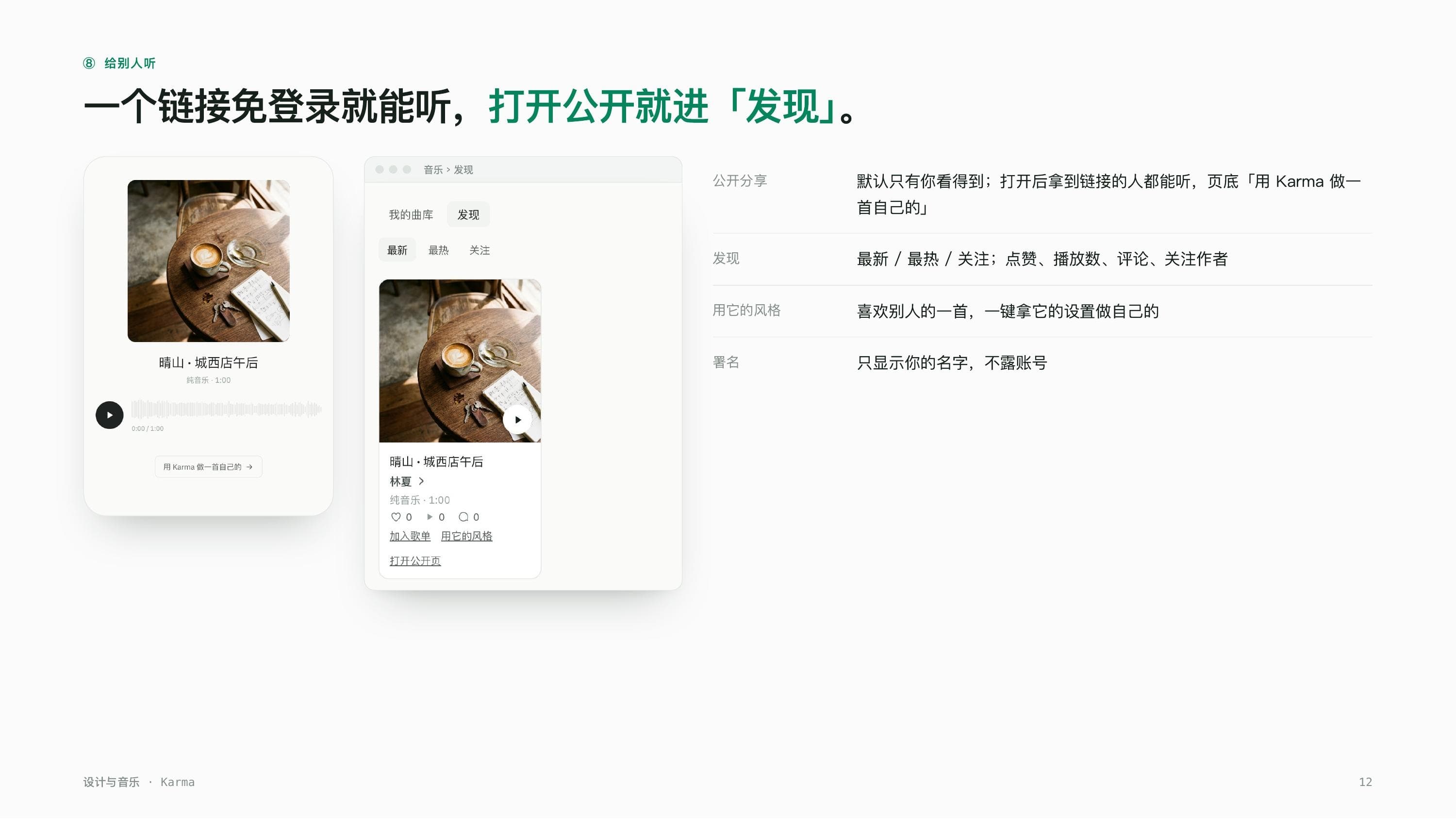
Once I landed on a version I liked, I went ahead and shared it publicly. Public sharing defaults to visible only to you; once you open it up, anyone with the link can listen, and the page footer includes a line inviting listeners to "make your own with Karma." Switch to "Discover" and sort by newest, most-played, or followed, with support for likes, play counts, comments, and following an artist. If you like someone else's track, one tap lets you grab its settings and make your own version. Attribution shows only my display name — never the underlying account.
13. Looking back: what this launch actually saved me
From opening the Design avatar to confirming the final score, the whole thing took less than an afternoon — four minutes for the material bundle, under four minutes combined for four pieces of music, with every revision, version swap, and lyric tweak just a tap away. The old way meant a week just waiting for a designer's slot, then a separate search for music, more waiting, and lingering worry about copyright. More importantly, what came out of this — the poster, the insert card, the cover, the banner, and four pieces of music — shared one consistent tone, Qingshan's own, not a generic template that could belong to any shop.
If I had to write the whole flow down as repeatable steps, it would look like this: open Design — Discover > Design, describe the brand, audience, tone, and palette, or just tap a bundle to run. Pick and revise — on the canvas, edit each piece individually: tap to mark it, touch-edit a section, change the aspect ratio, edit the text. Open Music — Discover > Music, write lyrics from one sentence, or score a scene. Pick a version — generate two at once, trim and tweak, save as a new take. Put it to work — the images and the song land in your project and your asset library, ready to hand to the video or channel avatars.
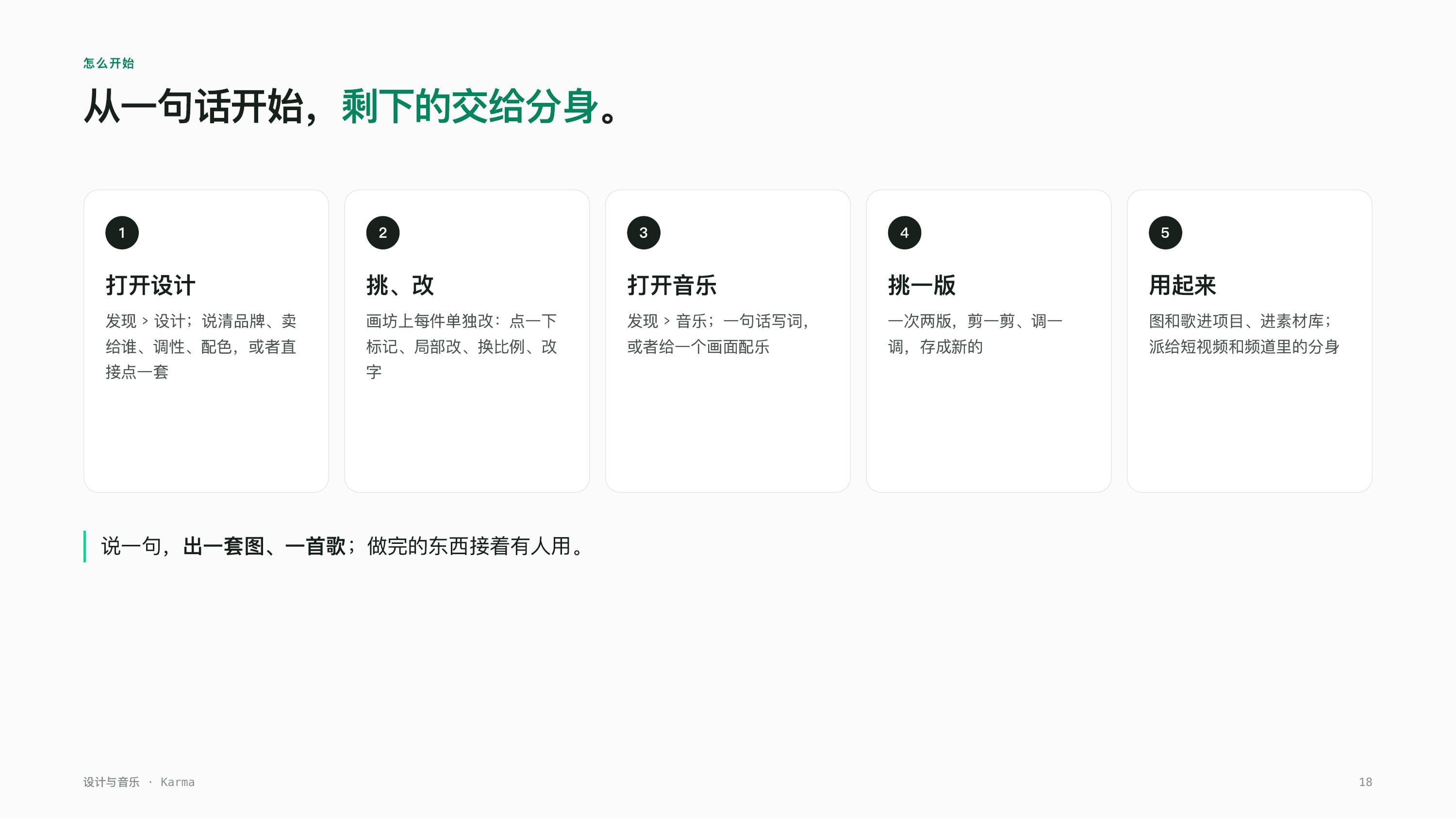
Say one line. Get a visual kit and a song — and whatever comes out of it immediately has somewhere to go, instead of sitting in some folder until the next launch reminds you it exists.
For me, the Design and Music avatars never just solved "make an image" or "write a song" — they turned the two most time-consuming, most schedule-wrecking parts of a small shop's product launch, finding a designer and sourcing music, into something one sentence could handle. And neither avatar works in isolation: like Ledger, Law, and the Growth-team avatars, their output lands in the same project — an image can go straight to a Growth-team avatar to post on Xiaohongshu, a song can go straight to another Studio avatar cutting a video. One sentence doesn't just get you an image or a song — it gets you a whole set of on-brand materials that's immediately ready to be put to work. If you've also been stuck hunting for an AI design tool or a way to score your shop's videos without worrying about licensing, this was, honestly, the easiest launch I've run in the past six months.